Best Place to Sell Rust Skins for Real Money
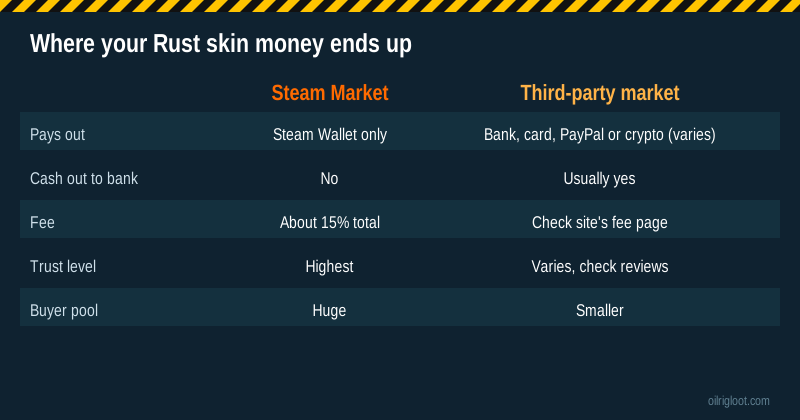
The best place to sell Rust skins for real money is a well-known third-party marketplace that supports Rust, has a public fee page and signs you in through Steam's official login. The Steam Community Market is safer, but it only pays you in Steam Wallet funds, which can't be moved to a bank. So if your goal is actual cash in your account, the Steam Market is the wrong tool, no matter how convenient it is.
This guide compares the routes Rust players actually use to turn skins into money: cash marketplaces, instant-sell trade bots, private sales and skin gambling sites. We'll be honest about the last one, because it's not a sale at all. Depositing skins on a site like RustClash turns them into gambling balance, which you might grow or might lose. That route is 18+ only (or your local age of majority), RustClash isn't available in Idaho, Montana, Michigan, Nevada or Washington, and it holds no gambling licence.
The four ways to turn Rust skins into money
| Route | How it works | Speed | Price you get | Cash out to bank |
|---|---|---|---|---|
| Cash marketplace (player to player) | You list, another player buys, the site pays you | Hours to days, depends on demand | Closest to market value | Usually yes |
| Instant-sell bot | A site buys your skin on the spot | Minutes | Below market (the bot's margin) | Often yes |
| Private sale | You find a buyer yourself | Varies | Whatever you agree | Yes, but risky |
| Skin gambling site | Skins become site balance for games | Minutes | Site's own valuation | Only after playthrough, and only what's left |
The trade-off is always price vs speed vs safety. Player-to-player markets usually pay the most but you wait for a buyer. Bots pay instantly but keep a margin. Private sales skip fees but carry the most scam risk.
Why the Steam Market doesn't count as "real money"
Plenty of players sell on Steam first because it's built in. It's the safest place to trade, and buyers are everywhere. But two points matter if you want cash:
- Sales go to your Steam Wallet only. Wallet funds buy games, DLC and other Market items. Steam doesn't cash them out to a bank.
- The cut is sizeable. Steam's own fee and Rust's game fee together are commonly reported at around 15% of the buyer's price. The listing window shows your exact "you receive" amount.
If you're happy turning Rust skins into a new game on Steam, that's fine. If you want rent money, you need a cash route.
What to look for in a cash marketplace
Several established marketplaces list Rust items next to CS2 items. Rather than ranking them on fees that change often, use these checks and compare the sites yourself on the day you sell:
- Rust support. Not every skin market lists Rust. Check that your item's category actually appears.
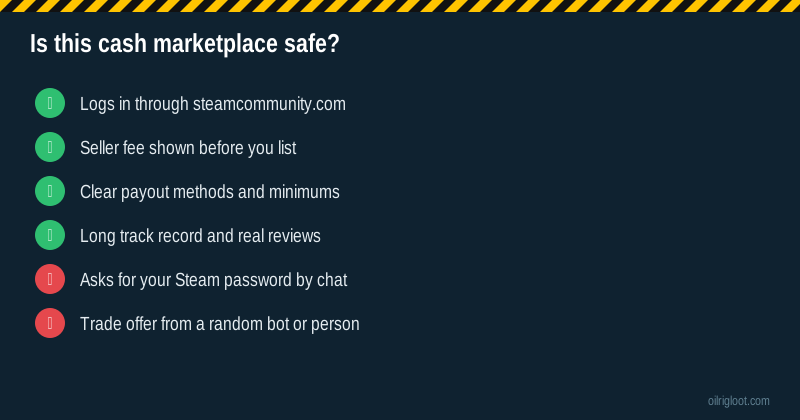
- Seller fee. Look for a public fee page. Compare the net amount you'd get, not the headline price.
- Payout methods. Bank transfer, card, PayPal-style wallets and crypto vary by site and by country. Check the minimum payout and any payout fee.
- Login method. The Steam sign-in page should be on steamcommunity.com. A lookalike Steam page is the most common way skins get stolen.
- Trade method. Some markets hold your item in a bot; others send it straight from your inventory to the buyer. Read how the trade happens before you list.
- Verification. Real-money payouts often need ID, especially above certain amounts. That's normal; plan for it.
- Track record. Look for years of history and recent reviews that mention payouts, not just "fast and easy" one-liners.
Pricing a Rust skin before you list
You'll get a better result if you know roughly what your skin is worth before any site gives you a number.
- Check the Steam Market price history. Even if you won't sell there, it's the best public record of what buyers pay. Look at the median over the last few weeks, not one spike.
- Remember Steam prices include fees. A cash market price is usually lower than the Steam buyer price, because Steam prices are inflated by the fee and by wallet money that can't leave Steam.
- Compare two or three markets. The same skin can sell for noticeably different amounts on different sites on the same day.
- Watch for thin demand. Rare or older Rust items may have very few buyers. Price slightly under recent sales if you want it gone.
A made-up example: a skin's Steam median is $12. On Steam you'd receive roughly $10.40 after the cut, and only as wallet funds. A cash market might show recent sales around $9.50, with a seller fee taking a slice of that. An instant-sell bot might offer $8 right now. Which is "best" depends on whether you value cash, speed or the highest number.
Instant-sell bots: when they make sense
Bots are useful when you want money quickly or you're clearing out low-value items that would sit unsold on a market for weeks. The catch is the margin. A bot has to resell the item, so it pays you less than a buyer would.
Use bots when:
- You have lots of cheap skins and listing each one isn't worth your time.
- You need cash today and can accept a lower price.
- The item has low demand on player markets.
Skip bots when you're selling one valuable item. A player market will almost always pay more for that.
Private sales: highest risk, lowest fees
Selling to another player directly, through Discord or a trading forum, skips marketplace fees. It's also where most scams happen. Common tricks include fake payment screenshots, chargebacks after a PayPal payment, impersonating a known trader, and fake "middleman" accounts. If you do sell privately:
- Use a payment method that can't be reversed, or have the buyer pay first.
- Never accept "I'll pay after you trade."
- Check the buyer's profile age and reputation.
- Confirm the trade details carefully in the Steam Mobile app before accepting.
Honestly, for most players a reputable cash marketplace is worth the fee just to avoid this.
Where skin gambling sites fit (and where they don't)
Some players search "sell Rust skins for money" and land on skin gambling sites. Here's the honest picture of what happens on RustClash:
- You can deposit Rust skins (and CS2 skins). Your Steam account needs the Steam Mobile Authenticator active for 15+ days to avoid trade holds.
- The skins turn into gems, the site's balance.
- Withdrawals come out as Rust skins from the onsite store or as crypto. Third-party reviewers report a 1x playthrough before you can withdraw, and a 2% to 5% crypto fee.
- The games carry published house edges from 6.5% (Roll) to 10% (cases and battles), so on average you get back less than you put in.
That makes a skin site a place to play with your skins, not a place to sell them. If you deposit $20 of skins and meet the playthrough, you might withdraw more than $20 or nothing at all. If you want a guaranteed amount, a marketplace is the right answer. If you're 18+, want to try the games and accept the risk, our invite adds 3 free welcome cases and a 5% boost on your next deposit.
Taxes and records
In many countries, profit from selling items can count as income or a capital gain, and gambling winnings have their own rules. Keep a simple log: date, item, price received, fees and payout method. A screenshot of each sale's details takes seconds and saves a lot of guesswork later. If you sell regularly or for large amounts, check your local rules or ask a tax professional.
Scam signs that should stop you
- A "buyer" who contacts you first and offers more than market value.
- Links to a Steam login page that isn't on steamcommunity.com.
- Requests for your Steam Guard code, password or API key.
- A trade offer from a bot or account that doesn't match the site's listing.
- "Support" agents messaging you on Steam or Discord about your sale.
- A site with no fee page, no payout rules and no history.
If anything feels off, cancel the trade in the Steam Mobile app. You can always list again tomorrow.
Quick comparison by goal
| Your goal | Best route |
|---|---|
| Safest possible sale, Steam funds are fine | Steam Community Market |
| Highest cash price | Player-to-player cash marketplace |
| Cash right now | Instant-sell bot (lower price) |
| Lowest fees, accept risk | Private sale with a trusted buyer |
| Play games with the skins (18+) | Skin site deposit, like RustClash |
Summary
- Steam Market is safe but pays Steam Wallet funds only.
- For real money, use a reputable cash marketplace that lists Rust items, check its fee page and payout options, and sign in through steamcommunity.com.
- Bots are fast but pay below market; private sales are cheap but risky.
- A skin gambling site is not a sale; you can lose the balance.
- Keep records of every sale.
If you're using skin sites and it stops being fun, take a break. In the US call or text 1-800-GAMBLER, in the UK call 0808 8020 133, and see our responsible gambling page for more help.