Where to Enter a RustClash Affiliate Code (Or Skip the Typing Entirely)
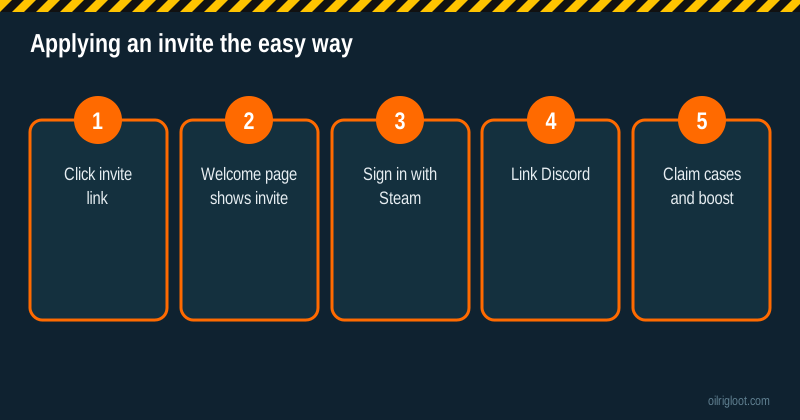
On RustClash you apply an affiliate code through the invite welcome page or your account's affiliate/rewards area, and you can only attach one. The easiest way, by a mile, is to use an invite link: the code is already filled in before you even create the account. That's what our buttons do.
Here's every way to get it applied, what it actually unlocks and what to do if you think you missed it.
Option 1: Use an invite link (easiest)
- Click our "Apply the Invite Automatically" button.
- You'll land on RustClash's welcome page, which tells you who invited you and that you can claim 3 free cases.
- Sign in with Steam.
- Link Discord to unlock the welcome cases.
- Done. The invite is attached, and the 5% deposit boost applies when you deposit.
There's no box to find and nothing to mistype. It's also the method RustClash's own referral system is built around: every account's invite link lands on the same style of welcome page.
Option 2: Enter a code manually
If you'd rather type a code (say a friend gave you theirs), look in these places:
- The welcome or sign-up flow. Some invite pages have a field to confirm or change the code before you register.
- The Affiliates or Rewards section of your account, usually reachable from your profile menu. Clash-family sites keep the "use a code" field there.
- The deposit screen. Some sites ask for a code at first deposit. If you see one, that's where it goes.
Layouts change over time, so if you can't find the field, ask live chat: "Where do I enter an affiliate code?" They'll point you to it.
What the code actually unlocks
| Perk | Details |
|---|---|
| 3 free Welcome Cases | Needs Discord linked. Mostly Scrap (0.01 gems) |
| 5% deposit boost | Advertised as "5% Deposit Bonus"; third parties report 5% per deposit up to $100 |
| Normal account perks | Rakeback, daily level cases, rain, race, missions (not code-specific) |
The deposit boost is where the real value is for anyone who deposits. The free cases are a nice sample but are almost always worth pennies. See the welcome case odds.
How the 5% boost works in practice
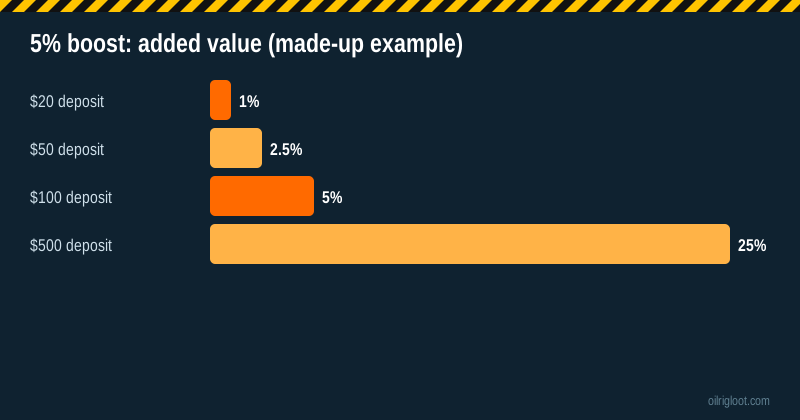
The boost adds 5% on top of a deposit. Made-up examples:
- Deposit $20, get about $1 extra.
- Deposit $100, get about $5 extra.
- Deposit $500, get about $25 extra.
Third-party sites report a cap of $100 per deposit, which you'd only reach on a $2,000 deposit. Check the cashier when you deposit for the exact amount you're getting.
Keep perspective: the boost is smaller than the house edge on every game (6.5% on Roll up to 10% on cases and battles) over time. It's a sweetener, not an advantage.
"I forgot to use a code at sign-up"
Don't panic. Try this:
- Open the Affiliates or Rewards section and look for a "use code" field. If it's there and empty, you can usually still add one.
- If there's no field, ask live chat whether they can attach an invite to a new account that hasn't deposited.
- If you've already used a different code, it can't be changed. That's normal on most sites.
Don't create a second account just to use a different code. Multi-accounting breaks the terms and can get every account closed.
Can you use more than one code?
No. One account, one invite. Codes don't stack. And promotional codes (one-off promos sometimes posted on socials) are different from affiliate/invite codes. Those are redeemed in the rewards area and don't replace your invite.
Why some codes "don't work"
- Account isn't new. Welcome cases are for new accounts.
- Discord not linked. Required for the welcome cases.
- Code already attached. Only one per account.
- Typo or wrong case. Copy and paste instead of typing.
- Expired promo code. One-off promos expire. Affiliate invites don't usually.
- Restricted region. Idaho, Montana, Michigan, Nevada and Washington are excluded under the US terms.
Full troubleshooting is in RustClash free case not working.
Is it OK to use an affiliate's code?
Yes. That's what invites are for. The affiliate earns a commission from RustClash's share, not from you. Your odds, prices and withdrawals are the same as anyone else's. We earn a commission when you use our link; see our affiliate disclosure. You get the 3 free cases and the 5% boost either way.
Affiliate code vs your own invite code
Every RustClash account also gets its own invite code or link in the Affiliates section. That's for inviting friends, not for using yourself. Inviting your own second account is multi-accounting and breaks the terms. If you share your code with friends, make sure they're 18+ and outside the restricted states.
Before you deposit with the boost
A few practical checks so the boost doesn't cause surprises later:
- Read the playthrough. Third-party reviewers report a 1x playthrough on deposited amounts before withdrawal. Ask live chat whether the boost amount has its own rules.
- Pick a method you can also withdraw with. Crypto deposits withdraw most simply. Card deposits cashed out in crypto need ID.
- Start small. The boost is proportional. A small first deposit still gets 5%, and you can test the withdrawal process cheaply before going bigger.
- Keep a record. Note the deposit amount and the boost credited. If the 5% doesn't appear, live chat will need those details.
Codes you'll see on other sites
You'll find plenty of other RustClash codes on YouTube, Reddit and promo-code sites, each tied to a different affiliate. They all unlock the same standard welcome offer. Some pages claim huge bonuses like "100% deposit match". RustClash's own affiliate page advertises a 5% deposit boost, so treat bigger claims with suspicion unless the site itself confirms them in the cashier. If a code promises something the cashier doesn't show, the cashier wins.
How to check the invite worked
After signing up through an invite, you can confirm it stuck in two ways. First, the welcome cases should appear as claimable once Discord is linked. Second, when you open the deposit screen, the 5% boost should show as part of the deposit summary. If neither appears, take a screenshot and ask live chat to check whether an invite is attached to your account before you deposit. It's much easier to sort out before money moves than after.
What happens behind the scenes when you click an invite
It helps to know why the link works better than typing. When you click our button, it goes through a short redirect on our own site (so we can count clicks), then to RustClash's tracking link, and finally to the welcome page for that invite. Along the way, RustClash records which affiliate sent you, both in the welcome page address and in your browser. When you then sign in with Steam on that same browser, the account is created with the invite attached.
That's why a few habits matter:
- Use the same browser and device for clicking the link and signing up. Switching from phone to PC halfway can lose the invite.
- Don't open the link in a private window and then sign up in a normal one. The invite lives in the window you clicked in.
- Avoid aggressive tracker blockers on that one visit if the welcome page doesn't show the invite. Some blockers strip referral details. You can turn them back on afterwards.
- Sign up soon after clicking. If you wander off for a week, clear your history and come back, the invite may not be remembered.
Does the invite affect odds or withdrawals?
No. This comes up a lot, so to be clear: being invited by an affiliate doesn't change your odds, case prices, the house edge, withdrawal fees or KYC rules. Affiliates are paid out of RustClash's revenue share; RustClash's public affiliate terms describe a 30% to 45% revenue share or CPA deals. Your account works exactly like everyone else's, plus the welcome cases and the 5% deposit boost.
Quick checklist before you sign up
- You're 18+ (or the age of majority where you live).
- You're not in Idaho, Montana, Michigan, Nevada or Washington.
- You have a Steam account and a Discord account ready.
- You've clicked the invite on the device you'll sign up with.
- You've decided a budget before you look at the cashier.
Verdict
You can enter a RustClash affiliate code in the invite flow or the Affiliates/Rewards area, but the easiest move is clicking an invite link so it's applied before you sign up. You'll get 3 free welcome cases (mostly scrap) and a 5% deposit boost. One code per account, 18+ only, and never multi-account to switch codes.