RustClash Free Case Not Working? Here's the Fix (9 Common Causes)
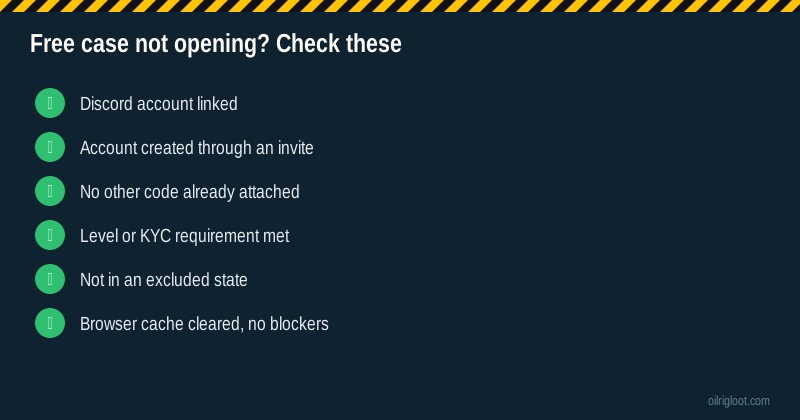
Nine times out of ten, a RustClash free case that won't open is a Discord problem. The welcome cases need a linked Discord account, and a lot of people skip that step. The other common culprits are using an old account, having a different code already attached, or not meeting a level or KYC requirement.
Work through these fixes in order. Most people are sorted by step three.
Fix 1: Link your Discord account
RustClash requires a linked Discord account to redeem the welcome cases. It's an anti-abuse measure, since Discord accounts are harder to mass-create than email addresses.
- Open your profile or settings on RustClash.
- Find the Connections or Link Discord option.
- Authorise the connection in the Discord pop-up.
- Refresh the rewards or welcome page and try the case again.
Tip: if the Discord pop-up closes instantly, your browser may be blocking pop-ups for the site. Allow pop-ups for RustClash and try again.
Fix 2: Make sure the account was created through an invite
The 3 welcome cases come with an invite. If you went straight to the site and signed up without one, there may be nothing to claim. Check the Affiliates or Rewards section for an "enter code" field; if it's empty and still available, you may be able to add one. If not, ask live chat.
Already signed up somewhere else in the past? See fix 4.
Fix 3: Check you haven't already got a code attached
Only one invite can be attached to an account. If you used a friend's or a streamer's code before, another code won't work and won't re-trigger welcome cases. If you already claimed the welcome cases, they won't appear again.
Fix 4: You're not a new account
Welcome cases are for new accounts. If your Steam account was used on RustClash before (even years ago, even briefly), the system sees it as existing. Making a fresh Steam account just for the welcome cases breaks the one-account rule and can get both accounts closed. Not worth it for cases that drop Scrap 98% of the time.
Fix 5: The level or KYC requirement isn't met
The ongoing daily level cases depend on your account level, which rises as you wager. If a level case is greyed out, you haven't reached that level yet. The level-5 case specifically needs KYC. If it says "verification required", go to your account verification page and submit your ID.
Fix 6: You're in a restricted region
RustClash's US terms exclude Idaho, Montana, Michigan, Nevada and Washington. Some countries also restrict skin gambling. If you're in one of these places, rewards won't work, and you shouldn't be playing. Don't use a VPN to get around it; that breaks the terms and risks your account and balance.
Using a VPN for other reasons, like work? Turn it off before visiting skin sites so you're not flagged.
Fix 7: Browser issues
Sometimes it's just the browser:
- Clear cache and cookies for the site, then log in again.
- Disable ad or script blockers for RustClash. Some block the case animation or the reward call.
- Try a different browser (Chrome, Firefox, Edge).
- Avoid in-app browsers. If you opened the link from Discord or Instagram, copy it into your real browser.
Fix 8: Steam login hiccups
If you can't log in properly, the rewards area may not load. Check:
- Steam isn't in maintenance (Tuesdays are a common window).
- You're signed in to the same Steam account each time.
- Steam Guard or the mobile app isn't waiting for a login confirmation.
Fix 9: The site is having issues
Occasionally the problem isn't you. Check RustClash's Discord or socials for maintenance announcements, or search "is RustClash down" to see if others are reporting problems. Wait an hour and try again.
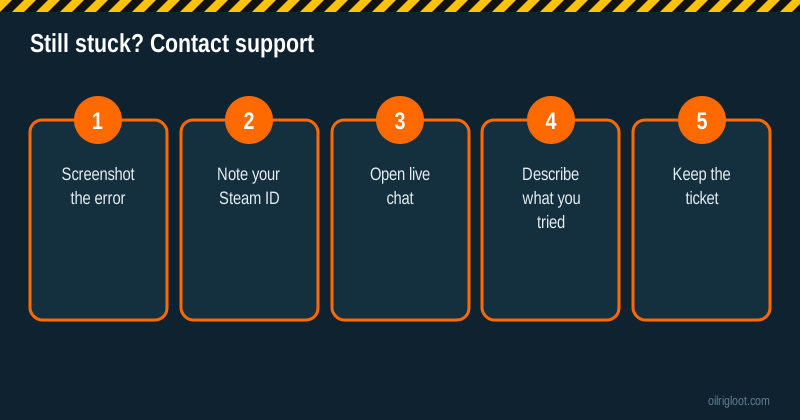
Still not working? Contact support properly
A good ticket gets a fast answer. Before you open live chat:
- Screenshot the error or the greyed-out case.
- Note your Steam ID (from your Steam profile URL).
- List what you've tried from this page.
- Say how you signed up (through an invite link, code, or directly).
Then open live chat and paste it all in one message. Keep the chat reference in case you need to follow up.
What support can and can't fix
Can usually fix: a Discord link that won't register, a bugged reward that didn't credit, a code that should have attached at sign-up.
Can't fix: an account that already used a different code, an existing account wanting new-user offers, or a restricted region.
Don't fall for "free case generator" scams
If you're searching for fixes, you'll run into sites and videos promising "RustClash free case generators", "unlimited gems" or "code hacks". These are scams. At best they waste your time; at worst they phish your Steam login and steal your inventory. RustClash's real free rewards are the welcome cases, level cases, rakeback, rain, races, missions and the Gold Coins faucet, all inside the site. Nothing external can add free cases to your account.
Make sure the free case is worth the hassle
Quick reality check: the welcome case drops Scrap worth 0.01 gems about 98% of the time. If you've spent 30 minutes fighting with it, the expected value of what's inside is a fraction of a cent. Fix the Discord link and try once more. If it still doesn't work, it's fine to let it go. See the full welcome case odds.
Free case problems by device
On PC: almost always a pop-up blocker on the Discord link, or a script blocker hiding the reward. Whitelist the site and refresh.
On iPhone: Safari's "Prevent Cross-Site Tracking" can interfere with logins that bounce between Steam, Discord and the site. If the Discord link fails, try again with the Discord app installed, or temporarily switch to another browser for the linking step.
On Android: in-app browsers are the usual culprit. Open the site in Chrome or Firefox, not inside Discord or a social app.
On a shared or work computer: you may be blocked by a network filter. Don't try to get around it. Use your own device on your own connection.
Prevention: set up right the first time
If you haven't signed up yet, avoid all of this by:
- Clicking an invite link (applies the invite).
- Signing in with Steam.
- Linking Discord straight away.
- Opening the cases.
Our step-by-step RustClash sign-up guide covers it in detail.
When it's a promo code, not the welcome case
Sometimes the thing "not working" isn't the welcome case at all but a one-off promo code from a stream or social post. Those are different:
- They expire. Many are valid for a day or a set number of uses. Once the cap is reached, they stop working for everyone.
- They may need a level or a deposit history. Some promos are only for players above a certain level.
- They're entered in the rewards area, not the invite field.
- They don't replace your invite. Using a promo code doesn't change which affiliate invited you.
If a promo code fails, check where it was posted for the expiry and requirements before contacting support.
Free case errors and what they usually mean
Error wording changes with site updates, but these are the messages players most often describe and the usual cause:
| What you see | Usual cause | Fix |
|---|---|---|
| Case greyed out | Requirement not met (Discord, level or KYC) | Link Discord, check level, verify ID for level 5 |
| "Already claimed" | Welcome cases were opened before on this account | Nothing to fix; use daily level cases instead |
| "Invalid code" | Typo, expired promo, or a code already attached | Copy-paste, check expiry, check Affiliates section |
| Spinner never stops | Browser blocker or slow connection | Disable blockers for the site, refresh, try another browser |
| "Not available in your region" | Restricted state or country, or a VPN | Turn off VPN; if you're in an excluded area, don't play |
If what you see isn't on this list, screenshot it and send it to live chat. The exact wording helps support find the cause quickly.
Will the free case expire if I wait?
Unclaimed promotional rewards can have time limits, and site rules can change. If you've linked Discord and the welcome cases are showing, open them the same day rather than leaving them. If they disappeared after a long gap, ask live chat, but don't expect them to be restored on an old account.
Verdict
A RustClash free case not working is almost always fixed by linking Discord, using a new account created through an invite, or meeting the level/KYC requirement. If none of that works, contact support with screenshots. And keep perspective: the free cases are a free sample, mostly scrap. 18+ only, and never use a VPN or extra accounts to chase them.