How to Sign Up for RustClash: The 5-Minute Setup (Free Cases Included)
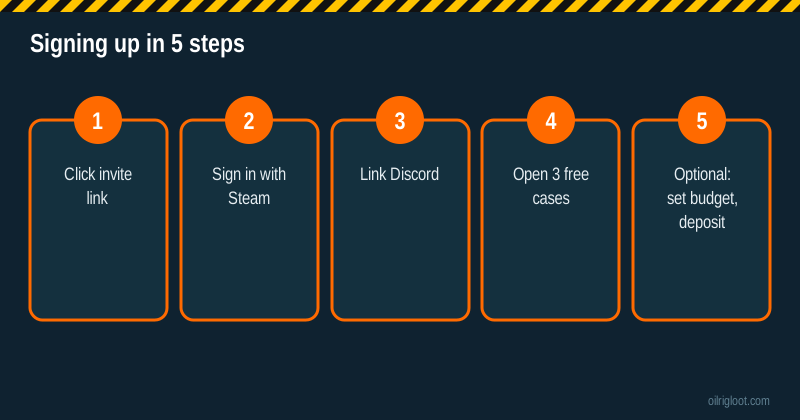
Signing up for RustClash takes about five minutes: click an invite link, sign in with Steam, link Discord, and open your 3 free welcome cases. There's no password to create and no deposit required. Doing it in that order means the invite (and the 5% deposit boost) is attached from the start, which saves headaches later.
Below is the full walkthrough, plus the account settings worth sorting before you ever deposit.
Before you start: who can sign up
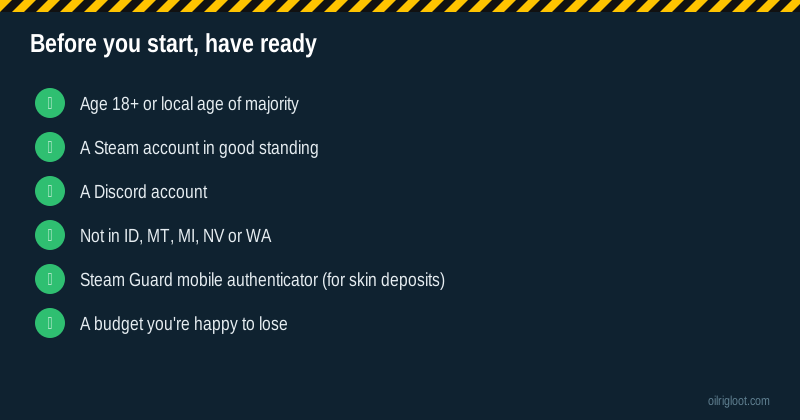
- Age: 18+, or the age of majority where you live if higher.
- Location: RustClash's US terms (January 26, 2026) exclude Idaho, Montana, Michigan, Nevada and Washington. US players may be directed to the US sweepstakes version. Check that skin gambling is allowed where you are.
- Accounts: one per person. Don't sign up if you've had an account before; welcome offers are for new users.
- Steam account: you log in with Steam, so it should be your main account in good standing.
- Discord account: needed to redeem welcome cases.
Step 1: Click an invite link
Click our "Start Your RustClash Sign-Up Now" button. It takes you through our click counter to RustClash's welcome page, which shows the invite and the 3 free cases. Doing this before you create the account is what attaches the invite.
Keep the same browser and device for the whole process. If you click on your phone and sign up on your PC, the invite may not carry over.
Step 2: Sign in with Steam
Hit the sign-in button and you'll go to Steam's official login page (check the address bar says steamcommunity.com). Log in and approve. You'll return to RustClash with your account created.
Safety tip: only ever log in to Steam on Steam's own domain. Fake "Steam login" pop-ups are the number one way skin traders get robbed.
Step 3: Link Discord
Go to your profile or settings and find the Discord connection. Authorise it. This unlocks the welcome cases. It's also the step most people skip, then wonder why their free cases won't open.
Step 4: Open your 3 free welcome cases
Head to the welcome or rewards area and open them. Expect Scrap: the published odds give 0.01-gem Scrap about 98% of the time, with a 0.01% chance at a Gold Rush AK (9.67 gems). It's a free look at the site, not a prize. Full breakdown: welcome case odds.
Step 5: Set up your account properly (before depositing)
This is where most guides stop, and it's where most problems start. Sort these now:
Set a budget in your head (or on paper)
Decide what you'll spend this month, in dollars, before you look at the cashier. Treat it as entertainment money. RustClash's games have a published house edge from 6.5% (Roll) to 10% (cases and battles), so losing it is the expected outcome.
Steam trade settings (if you'll deposit skins)
- Steam Guard mobile authenticator should be active for 15+ days. Without it, Steam puts trades on hold, and skin deposits get stuck. See the Steam trade hold guide.
- Set your Steam inventory to public so the site can see your skins.
- Grab your trade URL from Steam (Inventory > Trade Offers > Who can send me trade offers?) if the site asks for it.
Decide on deposit and withdrawal methods
How you deposit affects how you can withdraw. Crypto deposits withdraw most simply; card deposits cashed out in crypto need ID. Pick your methods with that in mind. Our deposits and withdrawals hub covers each one.
Consider getting KYC done early
You don't need ID to sign up. But if you plan to deposit by card, want the level-5 case or want to join rain before level 10, you'll need verification. Doing it before your first withdrawal means no surprise delays. See how long KYC takes.
Set your provably fair client seed
In the fairness settings, change your client seed to something of your own. It takes ten seconds and means you can verify rolls later. Guide: RustClash provably fair.
Optional: your first deposit
If you decide to play, keep the first deposit small. The invite gives a 5% deposit boost (third parties report 5% per deposit, up to $100). Methods include:
- Skins: Rust and CS2 skins.
- Cards: Visa and Mastercard.
- Gift cards and vouchers: PayPal gift cards, Neosurf.
- Bank and e-wallets: Trustly, Sofort, Neteller, WebMoney, WeChat.
- Crypto: BTC, ETH, LTC, USDT, USDC, SOL, XRP, ADA, BNB, TRX, DOGE, LINK.
Then, before playing much, try a small withdrawal so you know how it works. That's the best habit you can build on any skin site.
Sign-up mistakes that cause problems later
- Signing up without an invite. No welcome cases, no boost.
- Skipping Discord. Free cases won't open.
- Using a VPN or signing up from a restricted state. Accounts in excluded regions can be closed, balance and all.
- Making a second account. For more free cases or a different code. Breaks the terms.
- Depositing skins without the mobile authenticator. Trade holds.
- Depositing by card, planning to withdraw crypto, with no ID ready. KYC delay.
- No budget. The most expensive mistake of all.
What you'll see once you're in
A quick tour so nothing surprises you:
- Balance at the top: your Gems (prize currency) and, on the US version, Gold Coins.
- Games menu: Cases, Case Battles, Double, Upgrader, Mines, Plinko, Tiles, Crash, Roll and Sports, plus the Case Creator.
- Rewards: welcome cases, daily level cases, rakeback, race, missions, raffle, faucet.
- Chat: with rain every 30 minutes for eligible users (KYC or level 10+).
- Cashier: deposits and withdrawals.
- Fairness: seeds and verification.
Note that there's no coinflip or jackpot on RustClash, in case you're coming from an older Rust site that had them.
Signing up on mobile
It works the same in a phone browser. Use your main browser (not the in-app browser in Discord or Instagram), keep the Steam app handy to approve the login, and link Discord before you leave the page. Everything else, including deposits and the provably fair panel, is in the same menus, just stacked vertically.
Responsible play settings to know about
Before you play, know where the brakes are:
- Self-exclusion or account closure: available through support. If you ever need a break, ask live chat to close or exclude your account.
- Your own limits: set them outside the site too. A monthly budget in your banking app, a card block for gambling merchants, or a blocker like Gamban.
- Time limits: set a phone timer for your session. Case opening is fast, and time disappears.
Help is free and confidential: 1-800-GAMBLER (US), BeGambleAware (UK), Gamblers Anonymous anywhere. See our responsible gambling page.
Signing up for US players
If you're in the US (outside the five excluded states), you may be steered to the sweepstakes version. Sign-up is the same Steam and Discord process. The difference is in the currencies: Gold Coins for play-for-fun and Gems as the prize currency, with a free entry route (AMOE) and a Gold Coins faucet. Buying a bundle gives Gold Coins with bonus Gems. Read Gold Coins and Gems explained before buying anything, so you know which currency you're betting.
Is it safe to log in with Steam?
Logging in with Steam through Steam's official OpenID page is standard for skin sites: the site learns your Steam ID and public profile, not your password. That's safe as long as you're on the real steamcommunity.com page. What isn't safe is any page that asks you to type your Steam password into a box on a different domain, or any "support agent" who messages you on Steam or Discord asking you to confirm a trade or log in somewhere. RustClash support works through live chat on the site. Treat any unsolicited DM claiming to be staff as a scam.
A couple of extra protections are worth two minutes: turn on Steam Guard (you'll need it for skin deposits anyway), and check your Steam API key page to make sure no unknown key exists. A rogue API key is how many skin thefts happen, and it has nothing to do with the gambling site itself.
How long the whole thing takes
Clicking the invite, logging in with Steam and linking Discord takes two or three minutes. Opening the welcome cases takes another minute. Setting up the authenticator for skin deposits takes five minutes plus the 15-day wait.
Verdict
To sign up for RustClash: click an invite link, sign in with Steam, link Discord, open your 3 free cases. Then, before any deposit, sort your budget, Steam trade settings, deposit method and (if needed) KYC. Five minutes now saves days of support tickets later. 18+ only.