How to Deposit CS2 Skins on RustClash Without Getting Stuck
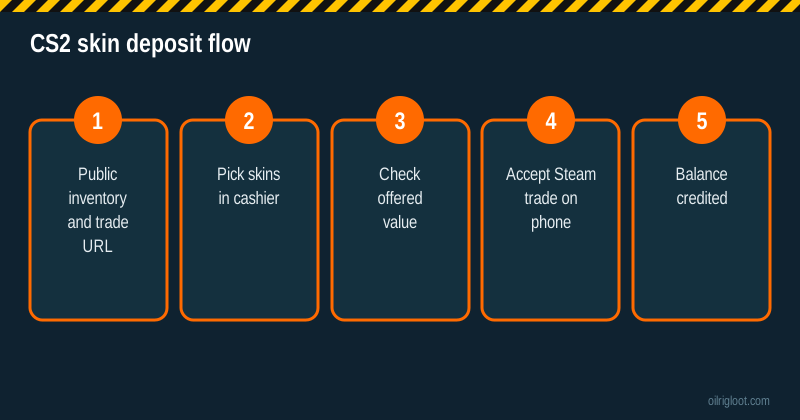
Yes, you can deposit CS2 skins on RustClash, even though it's a Rust-focused site. It works through a normal Steam trade: you choose skins in the cashier, accept the trade on your phone, and your balance updates. The thing that trips people up is Steam's trade hold, which kicks in unless your mobile authenticator has been active for 15+ days.
Here's the full process, how values work and how to avoid the scams that target skin traders.
Before you start
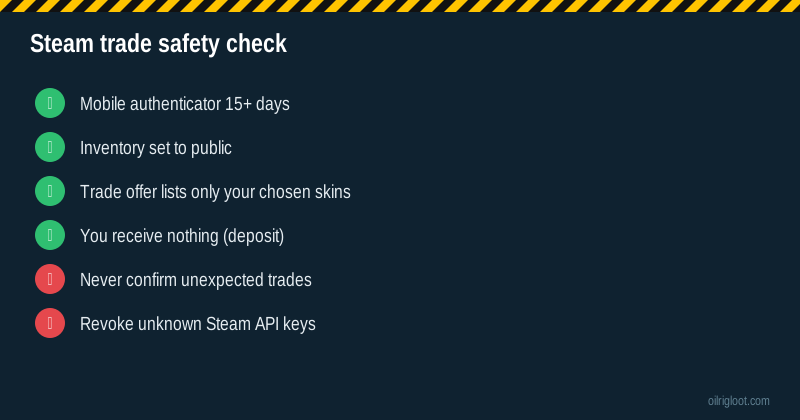
- Steam Guard Mobile Authenticator active for 15+ days. Otherwise trades get held.
- Steam inventory set to Public so the site can see your items.
- Your trade URL handy (Steam > Inventory > Trade Offers > Who can send me trade offers?).
- Skins not trade-locked. Newly bought or traded CS2 items can carry their own trade cooldown under Valve's rules. Locked items won't show as depositable.
- 18+, not in Idaho, Montana, Michigan, Nevada or Washington.
Step-by-step: depositing CS2 skins
- Open the cashier and choose Deposit > CS2 Skins (or Skins, then switch to CS2).
- Let the site load your inventory. If it's empty, check the inventory privacy setting and refresh.
- Select the skins you want to deposit. Each shows the value the site will credit.
- Check the total. If it looks low for an item, see the valuation section below before you continue.
- Confirm on the site. A Steam trade offer is generated.
- Open the Steam app and check the trade offer: it should list only the skins you chose, going out, with nothing coming back.
- Confirm the trade in the mobile authenticator.
- Balance credited once the trade completes.
How RustClash values your CS2 skins
The site sets a gem value for each skin based on market data. A few things to understand:
- It may not match Steam Market. Steam prices include Steam's fees and can be inflated for some items. Third-party market prices are often lower. Sites usually price closer to third-party markets.
- Rare or illiquid items (special patterns, high-tier stickers, very low float) may not be valued for their extras. If your skin's value is in its pattern or stickers, a skin site deposit is rarely the best place for it.
- Cheap skins may be valued at a small amount or have a minimum deposit value.
For pricey items, compare the offered value with a couple of market sites first. If the gap is big, selling elsewhere may be better.
Trade holds: why your deposit is "pending"
Steam adds a trade hold (items held for days before delivery) when:
- Your mobile authenticator hasn't been active for 15 days.
- You recently changed your password, email or authenticator.
- You recently logged in on a new device with Steam Guard turned off.
Skin sites generally can't accept held trades in real time, so the deposit may cancel or stay pending. Fix the cause and try again later. Full explanation: RustClash Steam trade hold deposits.
Scams that target skin depositors
The trade step is where thieves strike. Know these:
- API key scams. A phishing site steals your Steam session and creates an API key. Then, when you send a real trade, the scammer cancels it and sends a near-identical fake one to their own bot account. Fix: check steamcommunity.com/dev/apikey; if there's a key you didn't create, revoke it immediately and change your password.
- Fake login pop-ups. A fake "Sign in through Steam" window that's actually a picture inside the page. Real Steam logins open on steamcommunity.com.
- Fake support DMs. Someone messages you on Discord or Steam claiming to be RustClash staff and asks you to "verify" a trade. Real support uses the on-site chat.
Golden rule: in the Steam app, check the trade partner's profile and the exact items. If anything looks off, decline.
CS2 skins vs Rust skins vs crypto
| Method | Pros | Cons |
|---|---|---|
| CS2 skins | Use items you already have | Values may be below Steam Market; trade holds |
| Rust skins | Native to the site | Same hold rules; Rust item liquidity varies |
| Crypto | Fast, simple cash-out | Network fees; price volatility |
| Card | Instant | Bank declines; KYC for crypto cash-out |
Withdrawing after a skin deposit
You can withdraw through the on-site skin store or via crypto. Third parties report a 1x playthrough on deposits before withdrawing and a 2% to 5% fee on crypto withdrawals. Skin withdrawals depend on what's in the store and on Steam trade timing. See how to withdraw from RustClash in crypto for the crypto route.
Is depositing CS2 skins against Valve's rules?
Valve's Steam Subscriber Agreement doesn't allow using Steam items for gambling, and Valve has acted against skin-gambling sites and their trade bots in the past. In practice, the enforcement has targeted operators and bots rather than individual players, but it's a real risk: if Valve bans a site's bots, trades can be disrupted. Don't deposit items you couldn't stand to lose access to.
Tips to get the most from a skin deposit
- Deposit liquid, mid-tier skins rather than rare collectibles.
- Check the value shown against two market sites.
- Deposit in one trade where possible, to keep things simple.
- Use the invite's 5% boost on your first skin deposit.
- Screenshot the trade offer and the credited value.
When a CS2 skin won't show up in the deposit list
Common reasons an item is missing from the cashier:
- Trade cooldown. Recently acquired items can be locked by Valve's rules. The lock date shows on the item in your Steam inventory.
- Not accepted. Sites don't accept every item. Very cheap items, some cases, stickers, graffiti and agents may be excluded.
- Inventory cache. Steam inventories can take a while to refresh. Hit the refresh button in the cashier after a few minutes.
- Private inventory. Double-check it's public, not "friends only".
A made-up example of skin value maths
Say you have a CS2 rifle skin that shows $20 on the Steam Market. Made-up numbers:
- Steam Market price: $20 (but selling there nets you about $17 after Steam's fees, and it's Steam Wallet money, not cash).
- Third-party market price: $16 to $17.
- Site deposit value: around the third-party price, say $16.50.
- 5% invite boost: +$0.83.
So the site isn't necessarily "lowballing" you; Steam Market prices just aren't real cash prices. Compare like with like.
Rust skins work the same way
Everything on this page applies to Rust skins too: same Steam trade, same authenticator rule, same API scam risks. The main difference is liquidity. Popular Rust skins (well-known AK, MP5 and door skins) price easily; obscure workshop items can be thin, so their deposit value may be low or they may not be accepted at all. If you trade both games, it's worth checking which of your items the cashier values better before choosing what to deposit.
What to do if the trade fails halfway
Sometimes a skin deposit trade gets cancelled, expires or errors out. Here's how to handle each case:
- Trade offer expired. Offers from deposit bots usually have a short window. If you didn't confirm in time, nothing left your inventory. Start a new deposit.
- Trade cancelled by Steam. Often due to a hold or a Steam outage. Check that your items are still in your inventory, then try later.
- Items left your inventory but no balance. Check your Steam trade history (Inventory > ... > Trade History). If the trade went to the site's bot, contact live chat with the trade ID and a screenshot. If it went to a different account, you may have accepted a fake offer: revoke any API keys and change your password immediately.
- Steam is down. Steam has regular maintenance windows and occasional outages. Skin deposits won't work until it's back.
Keeping one screenshot of every trade confirmation makes all of these much faster to sort out.
Why some players deposit skins instead of cash
There are a few legit reasons: you already own skins you don't use, you'd rather not put a card or bank account into a gambling site, or your bank blocks gambling payments. The downsides are the extra Steam setup, potential trade holds and values that track third-party market prices rather than Steam Market prices. If you're depositing skins to avoid a bank's gambling block that you set up yourself, that's worth pausing on: the block was probably there for a reason.
Quick recap
Public inventory, authenticator for 15+ days, check values, confirm only the exact trade you started.
Verdict
Depositing CS2 skins on RustClash is easy once your Steam account is set up: public inventory, mobile authenticator for 15+ days, select skins, confirm the trade in the Steam app. Watch the offered values on expensive items, and treat every trade confirmation as a scam check. 18+ only, and only deposit skins you're happy to lose.