How to Withdraw From RustClash in Crypto: The Full Walkthrough
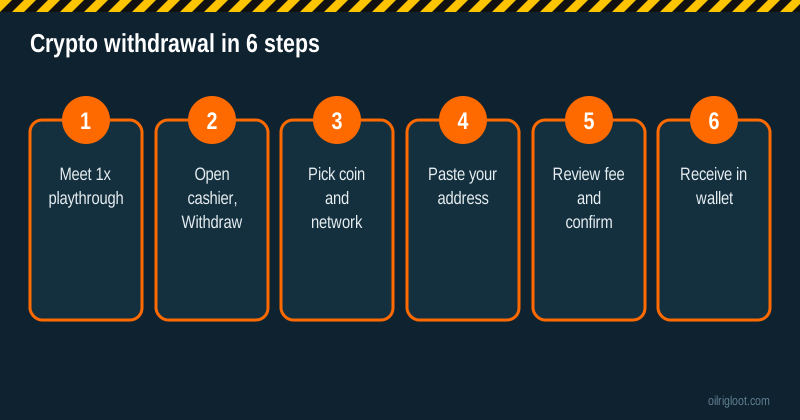
To withdraw from RustClash in crypto, open the cashier, choose Withdraw, pick a coin and network, paste your wallet address, check the fee and confirm. Before that works, you typically need to have played through your deposits once (third parties report a 1x playthrough), and if you deposited by card you'll need ID verification. Expect a fee of roughly 2% to 5%.
Here's every step, the gotchas, and what to do if your crypto doesn't show up.
Before you withdraw: the three checks
1. Playthrough
Third-party reviewers report that RustClash requires a 1x playthrough of deposited amounts before withdrawal. In plain English: if you deposit $50, you need to wager $50 in total before cashing out. This is an anti-money-laundering rule common across skin sites. The cashier will tell you if you haven't met it.
2. KYC
Crypto withdrawals of card deposits require ID. Larger withdrawals or unusual patterns can also trigger verification. If you deposited by card, get verified before you request a withdrawal. See KYC verification: how long it takes.
3. Minimums
There are minimum withdrawal amounts per coin. Small balances (like a few scrap drops from free cases) won't meet them. Check the cashier for the current minimums.
Step-by-step: withdrawing crypto
- Open the cashier and choose Withdraw.
- Select Crypto and pick your coin. Options have included BTC, ETH, LTC, USDT, SOL, USDC, XRP, ADA, BNB, TRX, DOGE and LINK, though withdrawal options can differ from deposit options.
- Choose the network (for coins like USDT that exist on several networks).
- Paste your wallet address. Copy from your wallet's "receive" screen. Check the first and last 4 characters.
- Add a memo or tag if the coin and your destination need one (common for XRP and some exchange deposits).
- Enter the amount and read the fee and the amount you'll receive.
- Confirm. You may get an email or 2FA prompt.
- Track it in your withdrawal history. Once sent, you'll see a transaction hash.
Picking the right coin
| Coin | Speed after sending | Network cost | Watch out for |
|---|---|---|---|
| LTC | Minutes | Low | Exchange minimums |
| SOL | Seconds | Very low | Token/network mismatch |
| USDT/USDC | Depends on network | Depends on network | Pick the exact same network as your wallet |
| BTC | 10 to 60+ min | Can be high | Fees on small withdrawals |
| ETH | Minutes | Variable gas | High gas eats small amounts |
| XRP | Seconds | Low | Destination tag for exchanges |
| TRX, DOGE | Fast | Low | Check wallet support |
For most people cashing out modest amounts, a low-fee coin like LTC, SOL, or a stablecoin on a cheap network makes sense. If you want to avoid price swings between withdrawal and selling, stablecoins are the simple choice.
The fee, explained
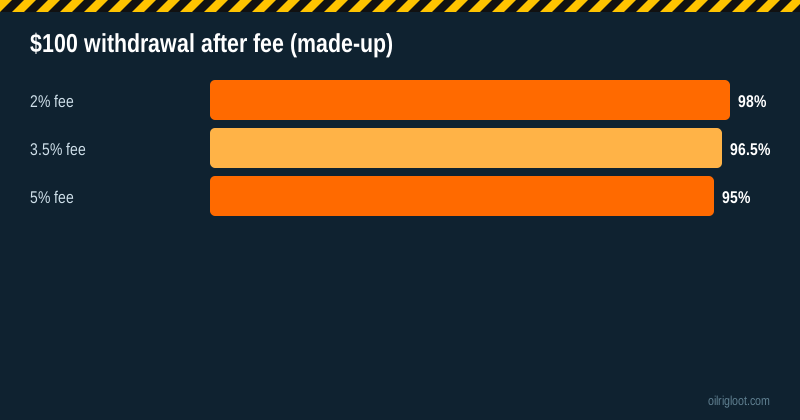
Third-party reviewers report RustClash crypto withdrawal fees of about 2% to 5%, depending on the coin. On top of that, a network fee may be built in. Made-up example:
- Withdraw $100 at 2%: you receive about $98 in crypto.
- At 5%: about $95.
Always read the "you'll receive" figure before confirming. Larger withdrawals can make a percentage fee add up, so factor it into your decision about when to cash out.
How long it takes
Crypto withdrawals are generally the fastest cash-out on RustClash. Most of the delay, when there is any, is:
- Processing time on RustClash's side (review, especially for larger amounts).
- KYC if triggered.
- Network confirmations after it's sent.
See our dedicated guide: RustClash withdrawal time: how long.
Withdrawal stuck? Here's what to do
- Check the status in your withdrawal history. "Pending" means RustClash hasn't sent it yet. "Completed" with a hash means it's on the blockchain.
- If completed: look up the hash on a block explorer. If it's confirmed and went to the right address, check your wallet is on the right network and, for exchanges, that any memo/tag was included.
- If pending for a long time: contact live chat. Ask whether KYC or a manual review is needed.
- If you used the wrong address or network: contact support immediately. Crypto sent to a wrong address usually can't be recovered.
Keep it polite and factual. Screenshots and the withdrawal ID speed things up.
Withdrawing to an exchange vs your own wallet
Own wallet (Phantom, Exodus, Electrum, a hardware wallet): you control it fully, and there are no exchange rules about gambling transfers.
Exchange (Coinbase, Kraken, Binance): convenient if you want to sell to cash. But some exchanges restrict or review deposits from gambling sites, and many require memos or tags for certain coins. Check your exchange's terms first.
Many players withdraw to their own wallet, then move to an exchange when they want to sell.
Taxes and record-keeping
Gambling winnings and crypto disposals can both be taxable depending on where you live. Keep records of deposits, withdrawals, dates and amounts in both crypto and your local currency. We're not tax advisers; talk to one if amounts are meaningful.
Avoid these crypto withdrawal mistakes
- Pasting an address for the wrong coin (e.g. an ETH address for a BTC withdrawal).
- Picking a different network from your wallet (e.g. USDT on TRON to an ETH-only wallet).
- Forgetting the memo/tag for XRP to an exchange.
- Withdrawing tiny amounts with BTC or ETH, where the fee eats a big share.
- Trying to withdraw card deposits as crypto without KYC.
- Using a VPN or playing from a restricted state: a fast way to have a withdrawal frozen.
Skins instead of crypto?
You can also withdraw through the on-site skin store, picking Rust or CS2 skins delivered by Steam trade. That's useful if you want specific items, but it's slower and depends on store stock and Steam trade holds. Crypto is usually the cleanest way to cash out.
A made-up example withdrawal
Invented numbers, start to finish. You deposited $60 in LTC, played through it, and your balance is now $85. You open the cashier, choose Withdraw > Litecoin, paste the receive address from your own wallet, and enter $80, leaving $5 to play with later. The summary shows a fee and "you'll receive" about $77 in LTC. You confirm, get an email confirmation, and a few minutes later the withdrawal history shows a transaction hash. You look it up on a Litecoin explorer, see confirmations climbing, and the LTC appears in your wallet shortly after. Total time: well under an hour, most of it network confirmations.
How to make every withdrawal smoother
- Withdraw to the same coin you deposited with when possible. It keeps records simple and avoids extra checks.
- Withdraw in fewer, larger amounts if fees are a flat component, or test with one small withdrawal first if it's your first time.
- Don't keep big balances on site. RustClash isn't licensed, so player funds aren't protected by a regulator. Cash out wins you want to keep.
- Keep your account details consistent. Same name, same country, no VPN. Mismatches trigger reviews.
- Save every withdrawal ID until the funds have arrived and you've checked them.
Network and memo cheat sheet
| Coin | Common networks | Needs memo/tag? |
|---|---|---|
| USDT | Ethereum (ERC-20), Tron (TRC-20), others | Usually no; but network must match |
| USDC | Ethereum, Solana, others | Usually no; network must match |
| XRP | XRP Ledger | Yes, for most exchanges |
| BNB | BNB Smart Chain | Sometimes, for exchanges |
| SOL | Solana | No (unless exchange specifies) |
| LTC, BTC, DOGE | Native chains | No |
Always follow the receiving wallet's or exchange's instructions; they know what they need.
First withdrawal? Do a test
If it's your first crypto withdrawal from RustClash, or your first to a new wallet, send a small amount first. Once it arrives, send the rest. The fee on a small test is a cheap insurance policy against a wrong address or network.
Should you convert to stablecoins before withdrawing?
If the option is available, withdrawing in a stablecoin like USDT or USDC means the value doesn't jump around between the moment you withdraw and the moment you sell or spend it. If you withdraw in BTC or SOL and plan to sell, price swings can work for or against you. Neither is right or wrong; just be clear which you're choosing.
Card deposits: plan the exit before the entry
If you're about to deposit by card, decide now how you'll withdraw. If the answer is crypto, do KYC first. If you'd rather not share ID, use crypto for both deposit and withdrawal. Planning the exit before the entry removes the most common reason crypto withdrawals stall.
Verdict
Withdrawing from RustClash in crypto is straightforward: meet the 1x playthrough, get KYC done if you deposited by card, pick a low-fee coin and the right network, paste your address carefully and read the fee before you confirm. It's typically the fastest cash-out option. 18+ only, and cash out wins you want to keep rather than leaving them on the site.