RustClash Steam Trade Hold on Deposits: Causes and Fixes
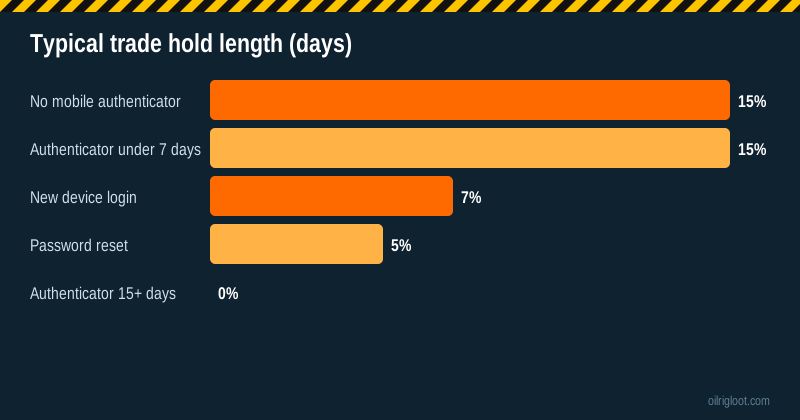
If your RustClash skin deposit is stuck on a "trade hold", it's Steam doing it, not RustClash. Steam delays item trades for up to 15 days unless your Steam Guard Mobile Authenticator has been active for at least 15 days. Security changes, like a password reset, can also trigger shorter holds. The fix is to set up the authenticator and wait it out, or deposit another way in the meantime.
Here's exactly why holds happen, how to check yours and what to do right now.
Why Steam trade holds exist
Valve introduced trade holds to stop item theft. If someone steals your Steam login, a hold gives you time to notice and cancel trades before your skins vanish. Accounts with the mobile authenticator (which requires a phone confirmation for every trade) are trusted more, so they skip holds once the authenticator has been active for 15 days.
The causes, ranked by how common they are
- No mobile authenticator. The big one. Email-only Steam Guard means held trades.
- Authenticator newer than 15 days. You just set it up. Holds apply until it's been active 15 days.
- Recent password reset. Can trigger a temporary trade restriction.
- New device login without Steam Guard. Can lead to holds on that device's trades.
- Recently removed and re-added the authenticator. Resets the clock.
Exact durations follow Steam's current rules, which Valve can change. Check Steam's support pages for the latest.
How to check if you'll get a hold
The quick test:
- In Steam, open Inventory > Trade Offers.
- Start a trade offer to any friend (you don't need to send it).
- If there's a hold, Steam warns you: "Items will be held for X days".
Or open the Steam mobile app's Steam Guard section to see how long the authenticator has been active.
What happens to a held RustClash deposit
Skin-site deposit bots typically can't accept items that would arrive days later at an unknown value, so:
- The deposit offer may cancel or expire.
- Your skins stay in your inventory if the trade didn't go through.
- If you accepted a held trade, the items sit in escrow (with Steam) until the hold ends, then deliver. Contact RustClash support with the trade ID if that happens, because the item's value may have changed.
Always check your inventory and trade history before trying again.
Fix: set up the mobile authenticator
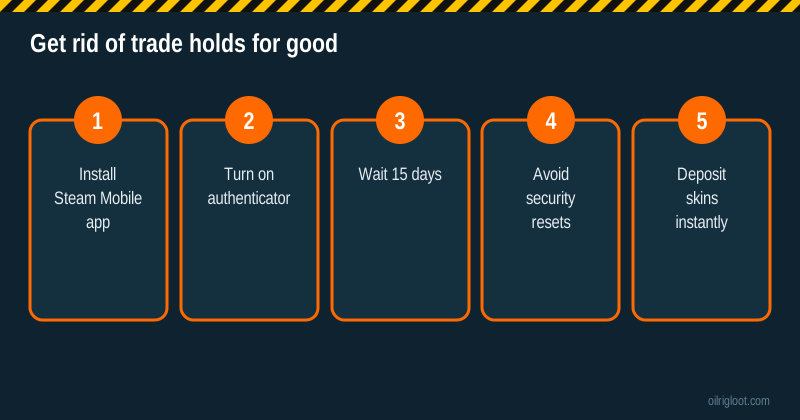
- Install the Steam Mobile app on your phone.
- Log in and open Steam Guard.
- Choose Add authenticator and follow the prompts (SMS confirmation).
- Save the recovery code somewhere safe. Losing it can lock you out.
- Wait 15 days. Don't remove and re-add it, or the clock resets.
After that, skin deposits go through instantly, and every trade asks for a tap in the app, which is also great protection against scams.
What to do in the meantime
You've got options while the 15 days tick by:
- Deposit with crypto. SOL, LTC and stablecoins land fast. See deposit with Solana.
- Deposit with a card. Instant, but plan for KYC if you'll withdraw in crypto. See card deposits.
- Use prepaid methods like PayPal gift cards or Neosurf where available.
- Or just wait. Honestly, a two-week cooling-off period isn't the worst thing.
Don't try these "fixes"
- Third-party "instant trade" services that ask for your login or API key. These are scams.
- Using someone else's Steam account without holds. Breaks Steam's and RustClash's terms.
- Accepting a held trade and hoping. Item values move in 15 days, and the deposit may not credit as you expect.
Holds on withdrawals, too
Trade holds can also affect skin withdrawals from RustClash's store to your Steam account. If your account has a hold, received items may be delayed. Another reason to set up the authenticator before you play. Crypto withdrawals don't involve Steam at all. See RustClash withdrawal times.
CS2 trade protection vs trade holds
Valve has also added trade protection and item cooldown rules for CS2 items over time, separate from the classic 15-day hold. Recently acquired CS2 items can be locked from trading for a period. If a CS2 skin is greyed out in the deposit list, check its trade lock date in your Steam inventory. Rust items follow Steam's general trading rules.
Security tips while you're in Steam settings
Since you're already setting up the authenticator:
- Visit steamcommunity.com/dev/apikey and revoke any API key you didn't create.
- Check Authorised Devices and remove any you don't recognise.
- Make sure your Steam email account has two-factor authentication too.
A quick timeline example
Made-up example to show how the timing works. On day 0 you try to deposit an AK skin, see a 15-day hold warning, and cancel. You install the Steam Mobile app and add the authenticator the same day. For the next two weeks every trade offer still shows a hold, so you either wait or use crypto if you want to play. On day 15 the warning disappears; you start a fresh deposit, confirm it in the app, and it credits within a minute. If on day 10 you'd panicked and removed then re-added the authenticator, the clock would have restarted at zero.
If you lose your phone
Losing your phone doesn't have to cost you your skins, but it will cost you time. Use the recovery code you saved to remove the authenticator, then set it up again on a new phone. Expect holds to apply again until the new authenticator has been active for 15 days. If you didn't save the recovery code, you'll need Steam Support to verify ownership, which can take a while. Write that code down today.
Is the authenticator really worth the hassle?
Yes, even if you never use a skin site. It's the single biggest protection your Steam inventory has. Every trade and market listing needs a tap on your phone, which stops most remote theft cold. Phishing kits that steal your login still can't confirm trades without your phone. For anyone who owns skins worth more than a few dollars, it should be non-negotiable, and it happens to make skin deposits instant as a bonus.
Trade holds vs trade bans vs trade cooldowns
These three get confused a lot, and they need different fixes:
| Term | What it is | What to do |
|---|---|---|
| Trade hold | Steam delays delivery of traded items for up to 15 days | Set up mobile authenticator, wait 15 days |
| Trade cooldown / trade lock | A specific item can't be traded until a date (common on recently acquired CS2 items) | Wait until the date shown on the item |
| Trade ban | Steam has banned your account from trading | Contact Steam Support; skin sites can't help |
If you see a red "trade banned" notice on your Steam profile, no skin site will be able to trade with you until Steam lifts it. That's between you and Valve.
Does RustClash ever add its own holds?
Holds on Steam trades come from Steam. RustClash can apply its own checks on withdrawals, such as playthrough, KYC or a manual review, but those aren't "trade holds" in the Steam sense. If you're not sure which you're dealing with, look at the message: a Steam hold appears in the Steam trade offer itself, while a site check appears in RustClash's cashier or as a message from support.
Why we recommend the authenticator even for crypto players
If you only ever deposit and withdraw in crypto, you might think the Steam side doesn't matter. But you still log in to RustClash with Steam, and a compromised Steam account means someone else can access your RustClash balance too. The authenticator protects both your inventory and your logins.
Quick fix summary
- Hold warning on deposit? Turn on the mobile authenticator and wait 15 days.
- Just reset your password? Wait out the temporary restriction.
- Item greyed out? Check its trade lock date.
- Need to play now? Use crypto or another method.
Will the hold rules change?
Valve adjusts Steam trading rules from time to time, especially for CS2 items. The 15-day mobile authenticator rule has been stable for years, but check Steam Support's trading pages if something doesn't match this guide.
Family Sharing and shared PCs
If you play on a shared or family PC, make sure you're logged in to your own Steam account before depositing, and never approve trades for someone else's account. Steam Guard ties confirmations to your phone, which helps keep shared machines from causing trade mix-ups.
Verdict
A Steam trade hold on a RustClash deposit comes from Steam, not RustClash. Turn on Steam Guard Mobile Authenticator, wait 15 days without resetting it, and your skin deposits will go through instantly from then on. Until then, use crypto or another method, or just take the break. 18+ only.