How to Sell Rust Skins on the Steam Market
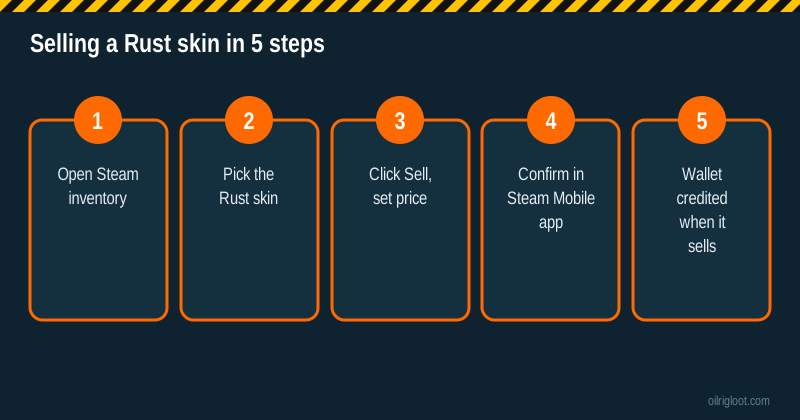
To sell Rust skins on the Steam Market, open your Steam inventory, select the Rust skin, click Sell, choose a price, then confirm the listing in the Steam Mobile app. When a buyer picks it up, the money lands in your Steam Wallet, minus Steam's fee and Rust's game fee, which together are commonly reported at around 15% of the buyer's price. Before you can sell at all, your account needs Steam Guard set up and to meet Steam's Market requirements. And remember the big limit: Steam Wallet money can't be withdrawn to a bank.
This guide covers requirements, fees, pricing, holds, wallet limits and what else you can do with Rust skins. Some of the alternatives at the end are skin gambling sites, which are 18+ only and carry real risk.
Before you can sell: Steam's requirements
Steam has rules to stop stolen items being dumped on the Market. Exact requirements change, so check Steam's support pages, but these are the usual ones:
| Requirement | Why it matters |
|---|---|
| Steam Guard turned on for a while (commonly 15 days) | New or recently secured accounts are restricted |
| Account not "limited" | Limited accounts (typically those that haven't spent on Steam) can't use the Market |
| No recent password reset | A reset can trigger a temporary Market restriction |
| Steam Mobile Authenticator active | Without it, listings face long holds and confirmations happen by email |
| Item is marketable | Some items are tradable or marketable only after a waiting period |
If you're new to Steam security, setting up the Steam Mobile Authenticator is the single most useful step. It's also what skin sites need for deposits and withdrawals. Our Steam trade hold guide explains the holds in detail.
Step by step: listing a Rust skin
- Open your inventory. In the Steam client or website, go to your profile, then Inventory, then choose Rust from the game dropdown.
- Pick the skin. Click the item to see its details. If it's marketable, you'll see a Sell button and a small price history.
- Click Sell. Steam opens a pricing window with two boxes: what the buyer pays and what you receive. Change either one; Steam fills in the other.
- Check the price history. The chart and the current lowest listing show what the item is actually selling for. Pricing slightly below the cheapest listing usually sells faster.
- Agree to the terms and confirm. Tick the subscriber agreement box and click OK.
- Confirm on your phone. Open the Steam Mobile app and approve the listing under confirmations. Until you do, the item isn't listed.
- Wait for a buyer. Popular items can sell within minutes; rare or overpriced ones may sit for days. You can cancel a listing any time before it sells.
The fee, explained
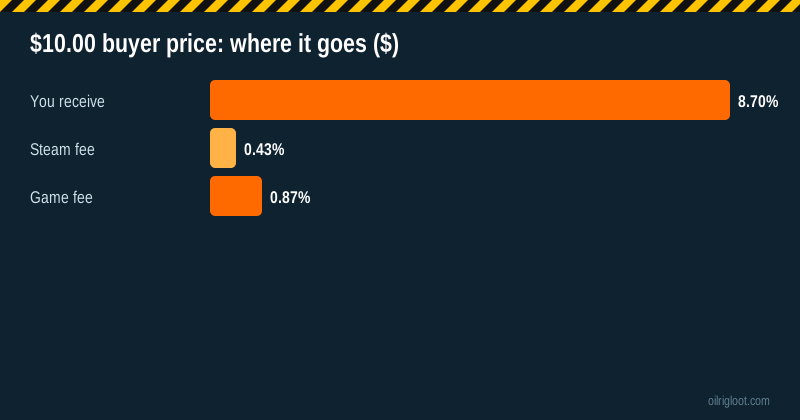
When you list, Steam splits the buyer's price into three parts: what you receive, Steam's transaction fee and the game fee for Rust. Steam's fee is about 5%. The Rust game fee is commonly reported at about 10%. Steam shows the exact numbers in the listing window, and small amounts can be rounded up because of minimum fees.
A made-up example: an item listed so the buyer pays $10.00 might break down as roughly $8.70 to you, about $0.43 to Steam and about $0.87 as the game fee. On cheap skins, minimum fees mean the percentage cut can be noticeably higher. Always look at the "you receive" figure, not the buyer price.
Pricing tips that actually work
- Check the order book, not just the chart. The Market shows current buy orders and sell listings. If you want an instant sale, you can sell to the highest buy order.
- Undercut slightly. One cent below the lowest listing is often enough.
- Watch for game events. Rust's weekly skin store and big updates can change demand, especially for newer skins.
- Don't panic-sell during dips. Prices for many skins move up and down over weeks.
- Bundle your attention, not your items. Each item sells separately; listing many cheap items can take time to confirm one by one.
Market holds and why your listing isn't showing
If Steam puts your listing on hold, it's usually a security measure. Common causes:
- No Steam Mobile Authenticator, or it was added recently.
- New device login on your account.
- Recent password or security change.
During a hold, the item is locked and won't appear on the Market until the hold ends. Setting up the authenticator and keeping it on is the best way to avoid holds next time.
Wallet limits and what you can spend it on
Steam Wallet balances have a cap (commonly cited as $2,000 or the local equivalent). Sales that would push you over the cap may be blocked until you spend some. Wallet funds can buy games, DLC, Market items and in-game items on Steam. They can't be cashed out, sent to someone else or moved to a bank.
That's the biggest thing people misunderstand about "selling" on Steam. You're turning skins into store credit.
Selling from your phone
You don't need a PC. In the Steam Mobile app, open the menu, go to your inventory, switch to Rust and tap the skin. If it's marketable you'll see a sell option with the same two price boxes. The confirmation then appears in the app's confirmations screen, so the whole thing takes under a minute once you've done it a couple of times. The app is also the quickest place to cancel a listing if you change your mind.
Using buy orders as a seller
Every Market item page has two sides: people selling and people wanting to buy. Buy orders are standing offers at a set price. If you click "Sell" and set your price at or below the highest buy order, your skin sells straight away to that buyer. That's the fastest exit, but you'll usually get a little less than listing and waiting. A simple rule: if you need the funds now, sell into the buy order; if you can wait a day or two, list just under the lowest sell price.
Selling lots of cheap skins
If you've collected a pile of low-value skins from playing or drops, selling them one by one can be slow, and minimum fees eat a bigger share of tiny prices. A few tips: sell the ones worth more than a few cents first, group your confirmations so you approve a batch at once in the app, and don't bother listing items where the "you receive" box shows almost nothing. Sometimes keeping or trading them makes more sense.
Alternatives to selling on Steam
If store credit isn't what you want, there are other routes. Each comes with trade-offs.
| Option | You get | Watch out for |
|---|---|---|
| Steam Community Market | Steam Wallet funds | About 15% fee; no cash-out |
| Third-party marketplaces | Cash, crypto or site balance | Fees, trade scams, Steam's rules on third-party trading |
| Trade for other skins | Different skins | Trade scams; agree values carefully |
| Keep and use them | Looks in game | Prices can fall |
| Deposit on a skin site (18+) | Site balance to play with | Gambling risk, house edge, Steam rules bar gambling with items |
On the last row: RustClash accepts Rust and CS2 skins as deposits. That's gambling, not selling. Your skins become a balance you can lose, the games carry a published house edge of 6.5% to 10%, and RustClash holds no gambling licence. Valve's Steam Subscriber Agreement bars using Steam items for gambling, so there's Steam-side risk too. RustClash is 18+ (or your local age of majority) and not available in Idaho, Montana, Michigan, Nevada or Washington. If you decide to try it, start with the free welcome cases and read our skin deposit guide and house edge comparison first.
Avoiding scams when selling skins
- Only confirm trades you started. If a confirmation appears that you didn't expect, decline it.
- Never share your Steam login or Steam Guard codes. Real buyers and sites never need them.
- Check your Steam Web API key. Scammers sometimes trick people into creating one so they can intercept trades. If you didn't create one, revoke it in your Steam account settings.
- Ignore "Steam support" messages in chat or Discord. Steam doesn't contact you that way about trades.
- Be wary of "too good" offers in DMs for your skins, especially those asking you to log in on another site.
Quick checklist
- Steam Guard and Mobile Authenticator set up and active.
- Account not limited, no recent resets.
- Check price history and current listings.
- List slightly under the lowest price for a quick sale.
- Confirm in the Steam Mobile app.
- Remember: proceeds are Steam Wallet funds, with a roughly 15% cut.
Bottom line
Selling Rust skins on the Steam Market is simple and safe once your account meets the requirements: list, price, confirm on your phone, done. The catch is that you're paying a sizeable fee and getting Steam Wallet funds you can't cash out. If you'd rather turn skins into something else, compare third-party options carefully, and treat skin gambling as entertainment spending only, never as a way to "cash out."
If skins or gambling are taking more of your time or money than you'd like, talk to someone. In the US call or text 1-800-GAMBLER, and see our responsible gambling page.