RustClash Withdrawal Time: How Long Until You Get Paid?
Most RustClash crypto withdrawals are fast once you've met the requirements, while skin withdrawals depend on Steam. The things that turn a quick cash-out into a slow one are almost always the same: playthrough not met, KYC requested, a manual review on a larger amount, or a Steam trade hold on skins.
We'll go through realistic timings for each method, what slows things down and how to get paid as quickly as possible.
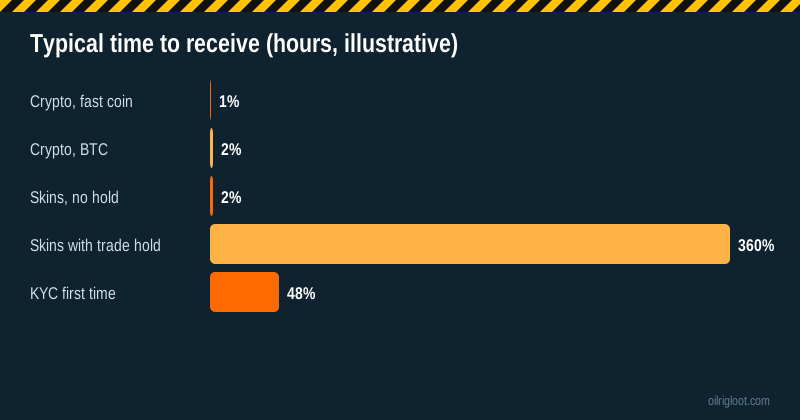
Withdrawal times at a glance
| Method | Typical timing once eligible | What can slow it |
|---|---|---|
| Crypto (LTC, SOL, XRP, stablecoins) | Often within the hour | Manual review, KYC, network congestion |
| Crypto (BTC, ETH) | Processing plus 10 to 60+ min confirmations | Network fees and congestion |
| Skin store, no trade hold | Minutes to hours | Store stock, bot availability |
| Skin store with trade hold | Up to 15 days | Steam hold rules |
| First withdrawal needing KYC | Add a day or two (varies) | Document quality, queue |
These are illustrative ranges based on how Clash-family sites and third-party withdrawal tests describe the process, not guarantees. RustClash doesn't publish a fixed withdrawal SLA in its public pages.
What happens after you click "Withdraw"
- Eligibility check. The system checks playthrough, KYC status and account flags.
- Processing. Automatic for routine amounts; manual review for larger or unusual ones.
- Sending. Crypto is broadcast to the blockchain; skins are sent by trade offer.
- Delivery. Network confirmations (crypto) or trade acceptance (skins).
Delays can happen at any step, but steps 1 and 2 are where most "why is it pending?" questions come from.
The five most common delays
1. Playthrough not met
Third-party reviewers report a 1x playthrough on deposits. If you deposit and try to withdraw without wagering it once, the cashier will block or hold the request. Fix: play through the remaining amount, or check your wager progress in the cashier.
2. KYC requested
Card deposits withdrawn as crypto need ID. The level-5 case and rain (below level 10) also need KYC, so some players already have it done. First-time KYC adds time while documents are reviewed. See how long KYC takes.
3. Manual review
Larger withdrawals, a big win soon after a deposit, or unusual patterns can trigger a manual check. It's standard anti-fraud practice. Respond quickly if support asks for information.
4. Steam trade hold (skins)
If your Steam Guard Mobile Authenticator hasn't been active 15+ days, skin withdrawals can sit in a hold for up to 15 days. See the trade hold guide.
5. Wrong details
A wrong address, missing memo/tag or network mismatch can mean funds go astray, which is far worse than a delay. Double-check everything.
How to get paid as fast as possible
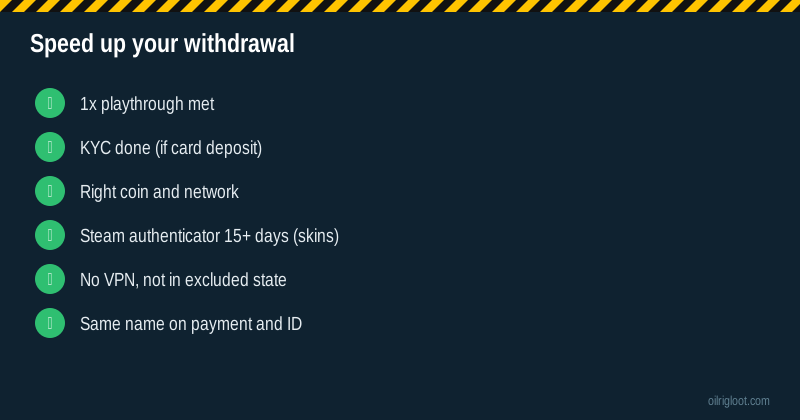
- Do KYC before you need it if you deposited by card or plan larger withdrawals.
- Meet the playthrough before requesting.
- Choose a fast coin (LTC, SOL, XRP, or a stablecoin on a low-fee network).
- Withdraw to your own wallet, which avoids exchange-side holds.
- Keep your account clean: no VPN, not in Idaho, Montana, Michigan, Nevada or Washington, one account only.
- Don't cancel and re-request repeatedly. It can reset your place in the queue.
What third-party testers report
Independent review sites that ran withdrawal tests (for example cs2wh.com's hands-on review) report receiving crypto withdrawals without major issues. Trustpilot reviews show the same split you see at most skin sites: many quick payouts, and a minority of slower ones that usually involve KYC. See our Trustpilot review breakdown.
Crypto confirmation times explained
Once RustClash sends crypto, the blockchain takes over:
- Solana: seconds.
- XRP: seconds.
- Litecoin: a few minutes.
- Tron (TRX, USDT-TRC20): about a minute.
- Ethereum: a few minutes, more under heavy load.
- Bitcoin: about 10 minutes per block; exchanges may wait for several confirmations.
If RustClash shows a transaction hash, check it on a block explorer. If it's confirmed but not in your wallet, the issue is on the receiving side (wrong network, missing memo, exchange crediting delay).
Skin withdrawal timing
When you withdraw skins from the on-site store:
- Pick items from the store with your balance.
- A trade offer is sent to your Steam account.
- Accept it in Steam (and confirm in the mobile app).
Without a trade hold, this can be quick. Stock matters: if the specific skin you want isn't available, you may need to pick something else or wait.
When to contact support
Reasonable timelines before chasing (illustrative):
- Crypto pending for several hours with no KYC request: contact live chat.
- KYC submitted but no update after a couple of days: follow up.
- Skins trade not received and no hold on your account: contact live chat with your Steam ID.
Give the withdrawal ID, amount, method and time. Polite and specific gets results faster than angry and vague.
Do withdrawal times change at busy times?
They can. Big weekends, major Rust updates and promotional events bring more players and more withdrawal requests, which can mean longer manual-review queues. Blockchain congestion also comes in waves: Bitcoin and Ethereum fees and confirmation times jump when the wider crypto market is busy. If timing matters, a low-fee fast coin and a request outside peak evening hours give you the best chance of a quick payout.
A made-up example timeline
Invented, but realistic. Friday 8 PM: you request a $120 withdrawal in USDT on a low-fee network. You deposited by card last week but did KYC on Wednesday, so it's approved. The request goes into a short manual review because it's your biggest withdrawal so far. At 9:10 PM it's marked completed with a transaction hash, and the USDT arrives in your wallet a minute later. Compare that with a player who requests the same amount having never done KYC: their withdrawal waits until documents are submitted and checked, which could easily stretch into the next week.
Crypto vs skins: which should you pick for speed?
If speed is the priority, crypto almost always wins. A skin withdrawal depends on three things outside your control: whether the store has the item you want, whether a trade bot is available, and whether Steam applies a hold. A crypto withdrawal depends mostly on RustClash's processing and the blockchain. Skins make sense when you actually want the item; crypto makes sense when you want your money.
There's also the fee side. Third-party reviewers report a 2% to 5% fee on crypto withdrawals. Skin withdrawals don't have that crypto fee, but the store's item prices may not match what you'd get selling the skin elsewhere, so compare before assuming skins are "free".
What "processing" really means
When a withdrawal says processing, one of three things is usually happening:
- An automatic check that you've met playthrough and that nothing is flagged. Seconds to minutes.
- A manual review by staff for larger amounts or unusual activity. This can take longer, especially at night or weekends.
- A KYC hold, waiting for your documents or for a reviewer to check them.
If you see processing for much longer than usual, live chat can tell you which of the three it is. Ask specifically: "Is my withdrawal waiting on a manual review or on KYC?" That gets a more useful answer than "where's my money?"
Withdrawal minimums and small balances
There are minimum withdrawal amounts per method. If your balance is below the minimum for your chosen coin, you'll need to either play on (not recommended just to reach a minimum) or pick a method with a lower minimum. Free case winnings and small leftovers often fall below minimums. That's normal, not a sign anything's wrong.
Keep records
Note every deposit and withdrawal: date, method, amount and ID. It makes support chats faster, helps you spot if anything goes missing, and gives you an honest picture of what you've actually spent. Many players are surprised when they add it up.
Fastest-path summary
Verify early, meet playthrough, choose a fast coin on the right network, withdraw to your own wallet and keep the withdrawal ID.
If a withdrawal goes missing
Gather the withdrawal ID, the method, the amount, the time and, for crypto, the transaction hash. Contact live chat with all of it in one message. Most "missing" withdrawals turn out to be pending reviews or receiving-side network issues.
One more tip
Avoid requesting withdrawals right after changing account details, such as your linked wallet or email. Fresh changes can trigger extra security checks and slow the payout.
Verdict
RustClash withdrawals are usually quick in crypto once you've met the 1x playthrough and any KYC requirement. Skins depend on Steam trade holds and store stock. To get paid fastest: do KYC early, choose a fast coin, withdraw to your own wallet, and keep your account within the rules. 18+ only.