How to Deposit on RustClash With a Credit Card (and Avoid the KYC Trap)
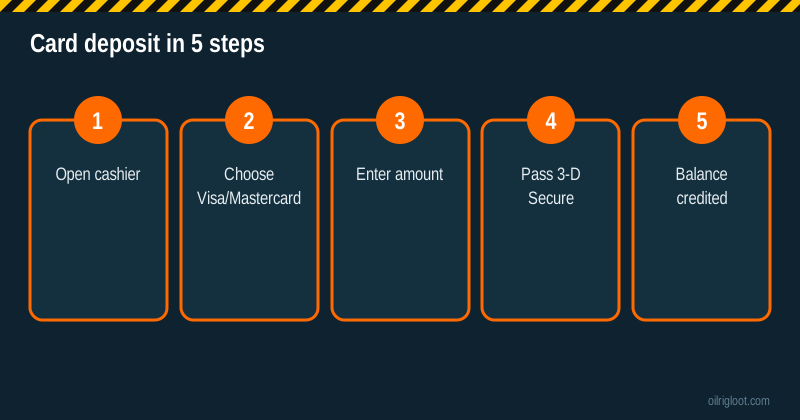
You can deposit on RustClash with a Visa or Mastercard straight from the cashier, and it usually lands in seconds. The catch most people discover later: if you deposit by card and want to withdraw in crypto, RustClash requires ID verification. Plan for that before you pay, and card deposits are easy.
Here's the full process, why cards get declined, what it costs, and a few honest words about using credit for gambling.
Quick facts
| Item | Details |
|---|---|
| Cards accepted | Visa, Mastercard (credit and debit) |
| Speed | Usually instant after 3-D Secure |
| 5% boost | Yes, with an invite (third parties report up to $100 per deposit) |
| Withdraw to crypto | Requires KYC (ID) for card deposits |
| Who can use it | 18+, card in your own name, not in ID, MT, MI, NV, WA |
Step-by-step: depositing by card
- Sign up through an invite (if you haven't yet) so the 5% boost applies. Our button does this.
- Open the cashier and choose Deposit.
- Select Visa/Mastercard (it may be labelled "Card").
- Enter the amount. Check the boost shows in the summary.
- Enter card details on the payment form. Use a card in your own name.
- Approve 3-D Secure in your banking app or by SMS code.
- Check your balance. It should update within seconds.
Keep the confirmation email or screenshot. If anything goes wrong, support will want the transaction reference.
Why cards get declined (and fixes)
Card declines on skin and gambling sites are common, and they're almost always from the bank side:
- Gambling block on the card. Many banks, and especially UK banks, let you (or require you to) block gambling merchants. If you've turned on a gambling block, respect it. It's there for a reason.
- Bank risk rules. Some banks decline gambling or crypto-adjacent payments by default. A call to the bank can clarify.
- 3-D Secure failed. The approval timed out. Try again and approve promptly.
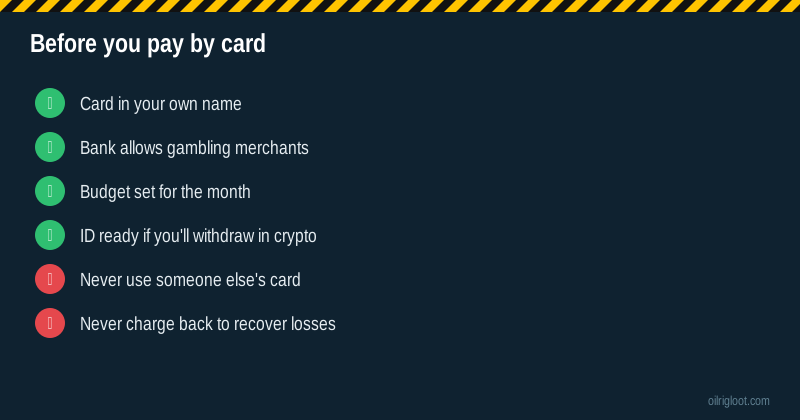
- Name mismatch. Cards must be in your name. Using a parent's or friend's card breaks the terms and can lead to account closure.
- Daily limit. Your bank's daily online spend limit was hit.
- Prepaid or virtual cards. Some don't support gambling merchants.
If the bank won't allow it, use another method rather than workarounds. Our guides to crypto and skins cover alternatives.
Fees
RustClash doesn't advertise a card deposit fee in its public pages; check the cashier summary before you pay. Your bank may charge:
- Cash advance fees on credit cards: many issuers code gambling transactions as cash advances, which can mean a fee plus interest from day one.
- Foreign transaction fees if the merchant is processed abroad (RustClash's operator is in Cyprus).
Those bank fees can easily cost more than the 5% boost adds. Check your card's terms.
The KYC trap: card in, crypto out
This is the single most common card-deposit surprise. Third-party reports and RustClash's rules indicate that crypto withdrawals of card deposits need ID verification. Why? Card payments can be reversed (chargebacks); crypto can't. Sites protect themselves by verifying who owns the card before sending irreversible crypto.
So if you plan to deposit by card and cash out in crypto:
- Do KYC early, before you need to withdraw.
- Have a clear photo of your ID and, if asked, proof of address.
- Make sure the card name matches your ID.
Full details: RustClash KYC verification: how long it takes.
Never do this: chargebacks
If you lose money after a card deposit, a chargeback might seem like a way to get it back. Don't. It:
- Breaks the site's terms and gets your account closed (with any balance).
- Can be treated as fraud ("friendly fraud") by your bank if you made the payment yourself.
- Can get you blocked from other sites using the same payment processors.
If you think a payment was genuinely unauthorised (someone used your card), contact your bank and RustClash support immediately.
Credit card vs debit card
Both work if your bank allows it. But they're not the same:
| Credit card | Debit card | |
|---|---|---|
| Whose money | Borrowed | Yours |
| Cash advance fee risk | Common | Rare |
| Interest | Can start immediately | None |
| Easy to overspend | Yes | Less so |
Our honest view: if you gamble at all, use a debit card or a prepaid method with money you actually have. Gambling with borrowed money turns losses into debt.
Card vs other deposit methods
| Method | Speed | Withdraw back via | Notes |
|---|---|---|---|
| Visa/Mastercard | Instant | Crypto (KYC) or skins | Bank declines common |
| Crypto (BTC, ETH, SOL, etc.) | Network confirmations | Crypto | No chargeback risk, simplest cash-out |
| Rust/CS2 skins | Trade time | Skins or crypto | Needs 15+ days Steam mobile authenticator |
| PayPal gift cards, Neosurf | Instant | Crypto or skins | Prepaid, good budget control |
| Trustly, Sofort, Neteller | Fast | Varies | Region-dependent |
Using the 5% boost on a card deposit
The invite's 5% boost applies to card deposits like any other. Made-up example: a $50 card deposit gets about $2.50 extra. But if your credit card charges a 3% to 5% cash advance fee, that fee eats the boost entirely. Another reason to prefer debit or prepaid methods.
Are card deposits safe on RustClash?
Card details are entered on a payment processor's form with 3-D Secure, which is the standard for online payments. The bigger risks aren't technical:
- RustClash has no gambling licence, so there's no regulator for disputes.
- The house edge (6.5% to 10%) means you'll lose over time.
- Card deposits are easy, which makes overspending easy.
Turn on spend alerts in your banking app if you use a card for gambling at all.
Region notes
Card acceptance varies by country. UK credit cards can't be used for gambling with UK-licensed operators, and many UK banks block gambling merchants on credit cards generally. RustClash isn't UK-licensed. See is RustClash legit for the licensing picture. In the US, the sweepstakes version sells Gold Coin bundles; check how card purchases appear in that version's cashier.
What a card deposit looks like on your statement
The charge usually shows under the payment processor's name or the operator's billing descriptor rather than "RustClash" in big letters, and it may be listed as a foreign transaction. If you don't recognise the descriptor, check the deposit confirmation in your RustClash history before assuming it's fraud. If you share a bank account or are budgeting, note the descriptor so you can track gambling spend honestly. Many banking apps let you tag or block merchant categories; tagging gambling spend once a month is a simple way to see the real total.
A made-up example of the true cost
Say you deposit $100 on a credit card that treats gambling as a cash advance with a 5% fee and 25% interest. Made-up numbers, but common terms:
- Cash advance fee: $5 straight away.
- 5% invite boost: +$5 in site value.
- Net so far: you've paid $105 for $105 of balance, before any play.
- If you don't clear the card that month, interest starts on $105 from day one.
Now add the house edge on top. That's why we suggest debit or prepaid methods if you deposit at all.
Card deposit troubleshooting: money left my account but no balance
It's rare, but it happens: the bank shows a charge, and your RustClash balance didn't move. Don't deposit again to "try once more". Instead:
- Wait 15 to 30 minutes. Payment processors sometimes confirm late.
- Check your deposit history in the cashier. A pending entry means it's in progress.
- Check whether the bank charge is pending or posted. Pending authorisations that never complete usually drop off your statement within a few days.
- Contact live chat with the time, amount, last four digits of the card and the bank's transaction reference.
Most "missing" card deposits are either pending authorisations that never completed or deposits that credited a few minutes late. Keep calm, keep screenshots, and let support trace it.
Setting limits when you deposit by card
Cards make it too easy to keep going, so build friction in on purpose:
- Turn on instant spend notifications in your banking app.
- Set a monthly gambling limit if your bank offers one, or use a separate debit card with only your entertainment budget on it.
- Don't save the card on the site if you tend to make impulse deposits. Typing the number each time is a useful speed bump.
- Use a gambling block if you notice you're depositing more than you planned. Most major banks offer one in the app.
Verdict
Depositing on RustClash with a credit or debit card is quick: cashier, card, amount, 3-D Secure, done. Know the catches: banks may decline, credit cards can add cash advance fees, and crypto withdrawals of card deposits need ID. Use a debit card with a set budget, do KYC early if you'll cash out in crypto, and never charge back. 18+ only.