How to Deposit on RustClash With Solana (SOL)
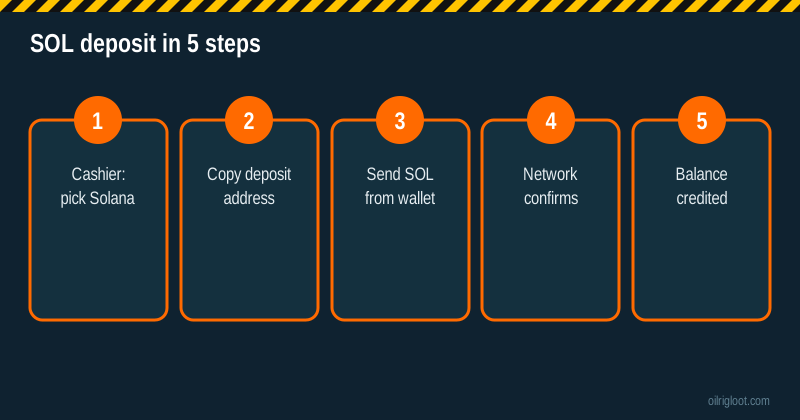
Depositing SOL on RustClash is one of the fastest ways to fund an account: pick Solana in the cashier, copy the address, send from your wallet, and it usually lands within a minute or two. Network fees on Solana are typically tiny. The only real risk is sending the wrong token or using the wrong network, so we'll spend most of this guide on getting that right.
Quick facts
| Item | Details |
|---|---|
| Asset | SOL (native Solana) |
| Speed | Usually seconds to a couple of minutes |
| Network fee | Usually a fraction of a cent (paid by your wallet) |
| 5% invite boost | Applies to crypto deposits |
| Withdraw back | Crypto withdrawals available; third parties report a 2% to 5% fee and 1x playthrough |
What you need
- A RustClash account (sign up through an invite to get the 5% boost; see how to sign up).
- A Solana wallet you control, such as Phantom, Solflare or Backpack, or an exchange account that supports SOL withdrawals.
- Enough SOL for your deposit plus a little extra to cover the network fee and the account rent minimum your wallet keeps.
Step-by-step: depositing SOL
- Open the cashier on RustClash and choose Deposit > Crypto > Solana (SOL).
- Copy the deposit address with the copy button. Don't type it by hand.
- Check the first and last 4 characters of the pasted address in your wallet match the cashier.
- Send SOL from your wallet. Choose the amount, review and confirm.
- Wait for confirmations. Solana usually finalises in seconds.
- Check your balance. The credit, and the 5% boost if eligible, should appear.
Keep the transaction signature (the long ID your wallet shows) until the deposit is credited.
Sending from an exchange instead of a wallet
Many people send directly from an exchange like Coinbase, Kraken or Binance. That works, with three cautions:
- Pick the Solana network in the exchange's withdrawal screen. Some exchanges offer several networks for the same coin.
- Check whether the exchange allows gambling-related withdrawals. Some exchanges' terms restrict sending to gambling sites, and some flag such transfers. Read your exchange's terms.
- Exchange withdrawal fees are often higher than the network fee itself, and exchanges may have minimum withdrawals.
Sending to your own wallet first, then to RustClash, gives you more control and a cleaner record.
The mistakes that lose crypto
Wrong token
A SOL address can technically receive other Solana tokens (SPL tokens such as USDC or USDT on Solana). But if the cashier address is for SOL deposits, sending a different token may not be credited automatically. Send only SOL to a SOL deposit address. For stablecoins, choose USDT or USDC in the cashier and check which network the cashier supports.
Wrong network
If you withdraw "SOL" from an exchange on a different chain (for example a wrapped version on another network), it won't arrive on Solana. Always choose Solana as the network.
Old address
Some cashiers issue a fresh address per deposit or change addresses occasionally. Copy a new address each time rather than reusing an old one from your wallet history.
Typing the address
Clipboard malware exists that swaps crypto addresses. Always check the first and last few characters after pasting.
How long a SOL deposit takes
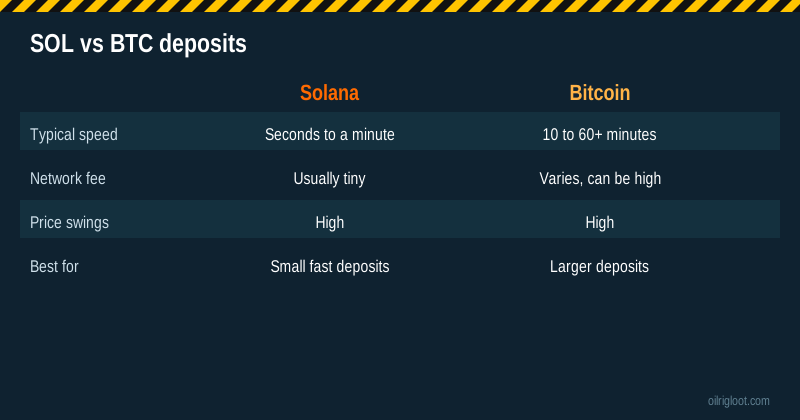
Solana blocks are produced very fast, so your transaction is usually confirmed within seconds. The site then credits after its own confirmation threshold. In practice, most SOL deposits appear within a minute or two. If it's been more than 15 minutes:
- Look up your transaction signature on a Solana explorer like Solscan or Solana Explorer.
- Confirm it's finalised and went to the right address.
- If yes, contact live chat with the signature, the amount and the time.
During heavy network congestion, Solana transactions can fail and need resending. Your wallet will show a failed status; the SOL stays in your wallet (minus a tiny fee).
SOL price swings: deposit value vs play value
When you deposit SOL, RustClash converts it to your site balance at the rate shown in the cashier at the time. After that, your balance is in site currency, not SOL. So:
- If SOL's price rises after you deposit, your balance doesn't grow.
- If SOL falls, your balance doesn't shrink.
That can be a feature (you're out of crypto volatility while playing) or a downside (you miss a pump). When you withdraw in crypto later, you'll receive SOL or another coin at the rate on the day you withdraw.
SOL vs other crypto for RustClash
| Coin | Typical speed | Typical fee | Notes |
|---|---|---|---|
| SOL | Seconds | Tiny | Fast and cheap; watch the token/network |
| LTC | Minutes | Low | Long-standing cheap option |
| USDT/USDC | Depends on network | Depends on network | No price swing while in transit |
| BTC | 10 to 60+ min | Can be high | Best for larger deposits |
| ETH | Minutes | Can be high | Gas fees vary a lot |
| DOGE, TRX, XRP | Fast | Low | Check minimums |
Using the 5% boost with SOL
The invite boost applies to crypto deposits. Made-up example: deposit the SOL equivalent of $40, receive about $2 in extra value. Check the cashier summary before sending, as minimums and boost caps can apply. Third parties report a cap of $100 per deposit.
Withdrawing back to SOL
Crypto withdrawals are available. Third-party reports mention:
- A 1x playthrough of deposits before withdrawal.
- A crypto withdrawal fee of roughly 2% to 5%.
- Faster processing than skin withdrawals in most cases.
Details: how to withdraw from RustClash in crypto and withdrawal times.
Is depositing crypto on a skin site safe?
The crypto side is safe if you send correctly. The bigger considerations:
- Crypto can't be reversed. Once sent, it's gone from your wallet. Double-check before you confirm.
- RustClash has no gambling licence, so disputes are handled by its own support.
- Taxes. Converting crypto may be a taxable event in your country.
- House edge. 6.5% to 10% by game. Set a budget.
Wallet setup tips for first-timers
If you're new to Solana:
- Write your seed phrase on paper, store it offline, and never type it into any website. RustClash will never ask for it, and nobody legit ever will.
- Use a dedicated wallet for gambling deposits if you hold other crypto. It keeps your main savings out of sight and makes budgeting easier.
- Turn on a wallet password or biometric lock on your phone.
- Ignore airdropped tokens you didn't ask for. Random tokens and NFTs that appear in Solana wallets are often scams that lead to draining sites.
A made-up example deposit, start to finish
Invented numbers, to show the flow: you want to deposit about $30. You buy a little over $30 of SOL on an exchange, withdraw it on the Solana network to your Phantom wallet, then open the RustClash cashier, choose Solana, copy the address and send $30 worth. Your wallet shows the transaction confirmed in a few seconds; RustClash credits about $30 plus a 5% boost of about $1.50 a minute later. You save the transaction signature until you see the balance. Total network cost: well under a cent.
Solana deposit troubleshooting table
| Problem | Likely cause | What to do |
|---|---|---|
| Wallet says "failed" | Network congestion or insufficient SOL for fees | Nothing was sent; retry with a little extra SOL |
| Explorer shows success, no balance | Site confirmations pending | Wait 10 to 15 minutes, then contact live chat with the signature |
| Sent USDC/USDT to SOL address | Wrong token | Contact support immediately with the signature; recovery isn't guaranteed |
| Exchange withdrawal stuck | Exchange review or wrong network | Check the exchange's history and support |
| Amount below minimum | Deposit smaller than cashier minimum | Contact support; small deposits may not credit automatically |
Keep your wallet's transaction signature for every deposit. It's the one piece of information support always needs.
Why many players like SOL for skin sites
Solana's speed and tiny fees make it handy for small, frequent deposits: you're not paying a dollar or more in network fees on a $20 deposit, as can happen with Bitcoin or Ethereum at busy times. The trade-off is that SOL's price moves a lot, so if you're buying SOL just to deposit, buy and send on the same day to avoid swings.
Recap
Choose Solana in the cashier, copy a fresh address, send only SOL on the Solana network, keep the signature.
Minimums and boosts
Check the cashier's minimum SOL deposit before sending; amounts below the minimum may not credit automatically. The 5% invite boost shows in the deposit summary when eligible.
Verdict
Depositing on RustClash with Solana is quick and cheap: choose SOL in the cashier, copy the address, send on the Solana network, and you're usually funded in a minute or two. Send only SOL to a SOL address, check the network every time, keep your transaction signature, and play within a budget. 18+ only.