How to Deposit on RustClash With Litecoin (LTC)
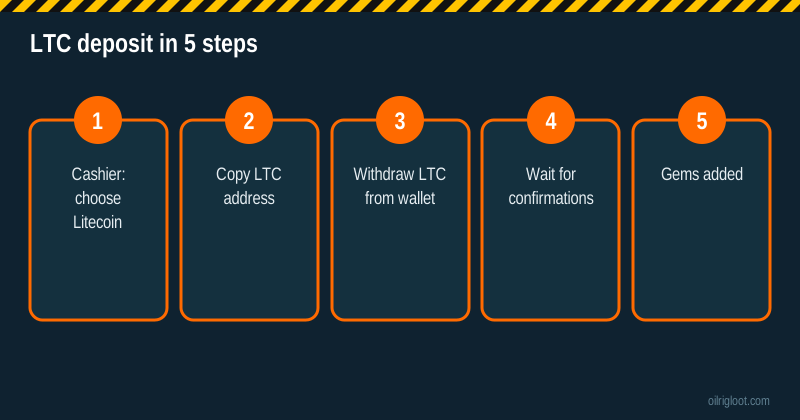
Litecoin is a solid middle-ground way to fund RustClash: fees are usually a few cents, blocks come about every 2.5 minutes, and the steps are simple. Open the cashier, pick Litecoin, copy the address, send LTC from your wallet or exchange and wait for the confirmations. The things that trip people up are address formats, exchange withdrawal minimums and sending a different coin by accident, so most of this guide is about those.
Quick note before we start: we earn a commission when you sign up through our link. We don't claim to have run every deposit described below ourselves; the steps reflect how RustClash's cashier and the Litecoin network work.
Litecoin deposit at a glance
| Item | Details |
|---|---|
| Coin | LTC on the Litecoin network |
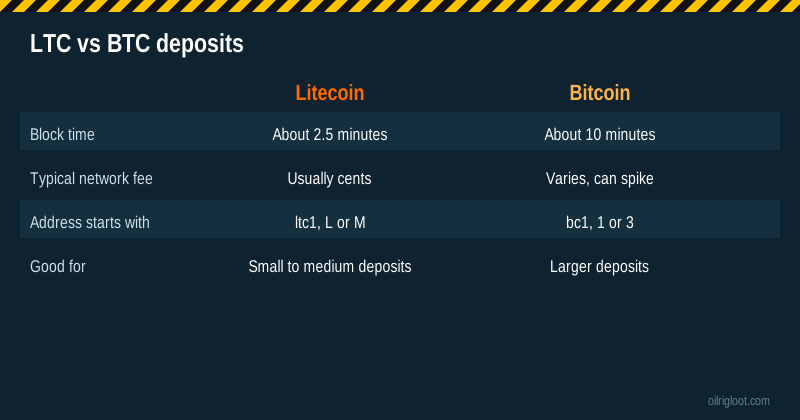
| Block time | About 2.5 minutes |
| Typical credit time | Roughly 5 to 20 minutes |
| Network fee | Usually a few cents, paid by the sender |
| Invite boost | 5% on your next deposit after redeeming a code |
| Payout options later | Crypto or Rust skins from the store |
Why players pick LTC for RustClash
Bitcoin is the default coin for a lot of people, but it isn't always the cheapest or fastest for a $20 or $50 deposit. When the Bitcoin network is busy, fees can climb and a deposit can sit unconfirmed for a while. Litecoin was built as a lighter, faster cousin of Bitcoin. It has a shorter block time and its fees are typically low even when markets are busy.
Compared with stablecoins like USDT, Litecoin has a downside: its price moves. If LTC drops 3% while you're waiting for confirmations, your gem balance reflects the value at the time the site credits it. For small, quick deposits that's usually a minor point, but it's worth knowing.
What you need before depositing
- A RustClash account. If you don't have one, our sign-up guide shows how to join with an invite so the 5% boost applies.
- Some LTC in a wallet you control (Litewallet, Exodus, Trust Wallet, a Ledger or Trezor) or on an exchange that supports LTC withdrawals.
- A little extra to cover the network fee or the exchange's withdrawal fee.
- Your exchange's minimum withdrawal checked in advance, as some exchanges set a higher LTC minimum than you'd expect.
Step-by-step: Litecoin deposit on RustClash
- Log in and open the deposit cashier. Choose the crypto section and select Litecoin (LTC).
- Copy the deposit address shown, using the copy button or by scanning the QR code with your phone wallet.
- Open your wallet or exchange and start a send or withdrawal of LTC.
- Select the Litecoin network. On exchanges, pick "LTC" or "Litecoin" as the network, not a wrapped or bridged version on another chain.
- Paste the address, then compare the first and last five characters with the cashier.
- Enter the amount, leaving room for the fee, and confirm the transaction.
- Save the TXID. Your wallet or exchange shows a transaction ID; keep it until the deposit is credited.
- Wait for confirmations. Your gems appear once the site sees the required confirmations.
Litecoin address formats explained
Litecoin has three common address types. They all work on the Litecoin network, but it helps to recognise them so you never mix them up with a Bitcoin address.
| Starts with | Type | Notes |
|---|---|---|
| ltc1 | Native SegWit (Bech32) | Most modern wallets use this; lowest fees |
| M | SegWit (P2SH) | Newer version of the old script format |
| L | Legacy | Older format, still widely supported |
| 3 | Old P2SH style | Some old wallets still show it; easy to confuse with Bitcoin |
The key point: send LTC only to the LTC address RustClash gives you. A Bitcoin address that starts with "bc1" or "3" won't accept Litecoin properly, and the reverse is also true.
How long until the gems show up?
Most LTC deposits land in a few minutes to about twenty. The time depends on three things: how quickly your wallet or exchange broadcasts the transaction, how many confirmations the cashier waits for, and how busy the network is. Exchanges are the usual source of delay; some batch withdrawals or hold them for a security review, especially on new accounts.
If your deposit has been pending for a long time:
- Search the TXID on a Litecoin block explorer. If it shows confirmations, the coins have left your wallet and arrived at the address.
- Check the address in the explorer matches the one in the cashier.
- Contact support with the TXID, amount and time if it has confirmed but isn't credited.
Mistakes that cost people money
- Sending LTC on the wrong network. Some exchanges offer Litecoin as a token on other chains. Always choose the native Litecoin network.
- Reusing an old deposit address without checking it in the cashier first. Grab a fresh copy each time.
- Sending a different coin to the LTC address, like BCH or DOGE, which can look similar in a wallet menu.
- Depositing less than the cashier minimum. Amounts under the minimum may not be credited automatically.
- Forgetting the exchange fee, so less LTC arrives than you planned.
- Not keeping the TXID. Without it, support has a much harder time finding your deposit.
Fees: what you'll pay
The Litecoin network fee is usually a few cents and is paid by whoever sends the coins. Exchanges often charge their own flat LTC withdrawal fee, which can be higher than the network fee itself. RustClash doesn't list an extra deposit fee for crypto in the material we reviewed, but check the cashier, because terms can change. On the way back out, third-party reviews report a 2% to 5% crypto withdrawal fee and a 1x playthrough on deposits; see our crypto withdrawal guide for details.
Funding from an exchange: practical tips
A lot of players buy LTC on an exchange and send it straight to the RustClash address. That works, but exchanges add a few wrinkles.
- Withdrawal holds on new accounts. Many exchanges hold withdrawals for a day or more after you add a new bank card or change security settings. Plan around that.
- Address whitelists. If you've turned on address whitelisting, you'll need to add the RustClash LTC address first, which can trigger a waiting period.
- Exchange terms. Some exchanges restrict or flag transfers to gambling sites. Read your exchange's terms; if it doesn't allow them, moving through your own wallet first doesn't change what you agreed to.
- Minimums and fees. Check both the exchange's minimum LTC withdrawal and RustClash's minimum deposit so the amount clears both.
Sending from your own wallet
Sending from a self-custody wallet such as Litewallet, Exodus or a hardware wallet is usually quicker than an exchange, because there's no withdrawal review. Your wallet may let you choose a fee level; the normal setting is fine for Litecoin almost all the time. On a hardware wallet, always confirm the address on the device screen, not just on your computer, because clipboard-swapping malware exists.
A simple example
Say you want $30 in gems. You send $31 worth of LTC from your wallet to allow for small price moves and the network fee. The transaction confirms in a few blocks, the cashier credits the value at the time of crediting, and, if it's your first deposit after joining through an invite, the 5% boost adds about $1.50 in gems. Figures here are illustrative only.
LTC vs other ways to deposit
| Method | Speed | Typical cost | Good for |
|---|---|---|---|
| Litecoin | Minutes | Cents | Small to medium deposits without card checks |
| Solana | Seconds | Tiny | Fast small deposits (SOL guide) |
| Card | Instant if approved | Card and conversion fees possible | Players without crypto (card guide) |
| Rust or CS2 skins | After trade confirms | Skin valuation spread | Players with items to spare |
Does Litecoin get the 5% boost?
The 5% bonus comes from redeeming an affiliate code, and it applies to your next deposit, whichever supported method you use. Joining through our invite applies it for you, so there's no code to type. Keep expectations sensible: on a $40 deposit, 5% is $2 in gems. It's a nice extra, not a reason to put in more than you planned.
Keep it fun and stay within the rules
RustClash is 18+ (or the age of majority where you live), holds no gambling licence and is not available in Idaho, Montana, Michigan, Nevada or Washington. Every game has a published house edge, so expect to lose over time. Set a budget in dollars, not in LTC, so price swings don't blur how much you've spent. If you need help, our responsible gambling page lists free support such as 1-800-GAMBLER and BeGambleAware.
Verdict
Litecoin is one of the easiest and cheapest ways to get gems on RustClash. Pick LTC in the cashier, use the native Litecoin network, double-check the address and keep the TXID. Do that and most deposits are done within a few minutes, with the 5% invite boost on top.