How to Deposit on RustClash With Dogecoin
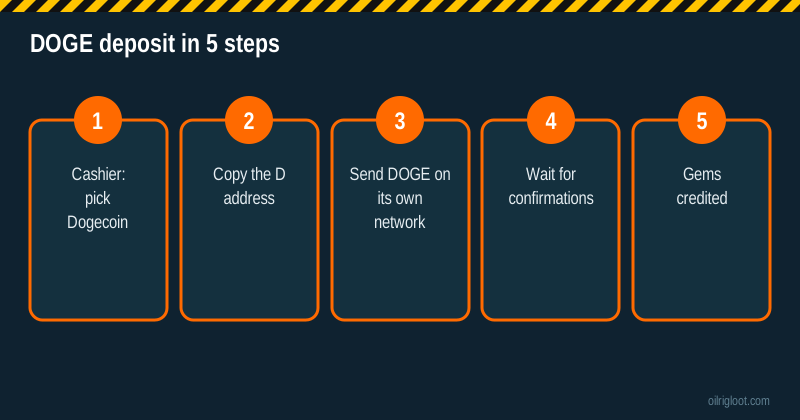
Dogecoin is one of the cheapest and quickest ways to put a small amount on RustClash. You open the cashier, pick Dogecoin, copy the address it gives you, send DOGE from your wallet or exchange on the native Dogecoin network and wait a few confirmations. That's the whole thing. Most problems come from three slips: the wrong network, a wrong or old address, or an exchange that holds your withdrawal for a security check. This guide takes you through each step and what to do if your gems don't show up.
You must be 18+ (or the age of majority where you live), and RustClash isn't available in Idaho, Montana, Michigan, Nevada or Washington. RustClash holds no gambling licence, so treat whatever you send as money you're fine losing.
Why people pick Dogecoin for RustClash
Players who already hold crypto usually go with whatever coin is cheapest to move. For small deposits, DOGE has a few things going for it:
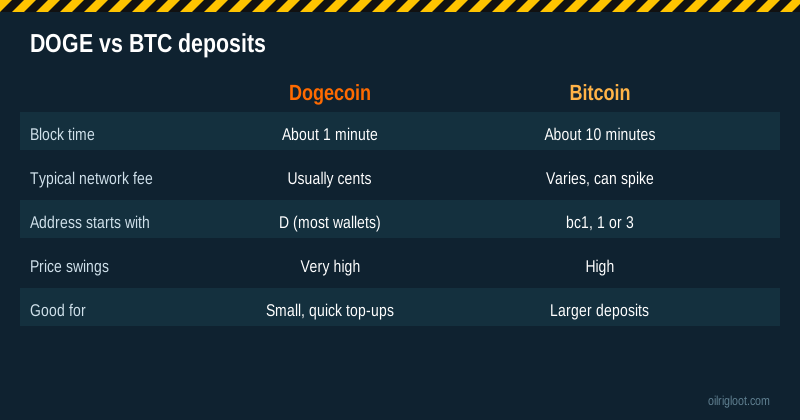
- Low network fees. A normal Dogecoin transaction usually costs a few cents or less, which matters when you're only topping up $10 or $20.
- Fast blocks. A new Dogecoin block comes roughly every minute, compared with about ten minutes for Bitcoin.
- Easy to buy. Almost every big exchange lists DOGE, so you won't struggle to find it.
- No bank in the middle. Your bank never sees a payment to a gambling merchant, so card declines aren't an issue.
The downside is price. DOGE is one of the most volatile big coins around. It can move 5% or 10% in a day, sometimes more. If you buy DOGE on an exchange and it sits there a few days before you deposit, the dollar value you end up with on RustClash may be quite different from what you paid.
What you need before you start
| You need | Why it matters |
|---|---|
| A RustClash account (18+) | You need to be signed in to see your personal deposit address |
| Some DOGE in a wallet or on an exchange | Enough to cover the deposit plus the network or exchange withdrawal fee |
| Your exchange's withdrawal limits checked | New exchange accounts often have caps or holds on first withdrawals |
| A note of your budget | Decide the dollar amount you're happy to lose before you send anything |
| Discord account (optional) | Needed to redeem the free welcome cases, not to deposit |
If you don't have an account yet, our sign-up guide covers the invite link, Steam login and Discord step. Joining through an invite before you deposit is what gets the 5% boost onto that first deposit.
Step by step: depositing DOGE on RustClash
1. Open the cashier and choose Dogecoin
Sign in, open the deposit or "Purchase" area and look for the crypto section. Pick Dogecoin from the list. RustClash shows a deposit address that belongs to your account, often with a QR code.
2. Copy the address carefully
Use the copy button rather than typing it. Most Dogecoin addresses start with a capital D. Before you send, check the first four and last four characters on both screens match. Clipboard-swapping malware exists and goes after crypto addresses, so this ten-second check is worth it every time.
Don't reuse an old address from months ago without checking. Cashiers sometimes rotate addresses, and the safest habit is to copy a fresh one for each deposit.
3. Send DOGE on the right network
This is where most lost deposits happen. On an exchange, when you withdraw DOGE you'll usually see a network dropdown. Choose the native Dogecoin network unless the RustClash cashier clearly says something else. Some exchanges also offer DOGE on BNB Smart Chain or other chains as a wrapped token. Those are different networks and use different address formats. Sending the wrong one to a native Dogecoin address can mean the coins never arrive and are very hard, sometimes impossible, to get back.
If you're sending from a self-custody wallet like a phone wallet that only does native DOGE, you don't need to worry about a network choice.
4. Wait for confirmations
RustClash's own FAQ says crypto deposits go through Fireblocks and need multiple blockchain confirmations before they're credited. Depending on the coin, that can take from a few minutes to a few hours. Dogecoin's one-minute blocks mean it's usually among the faster coins, but the time also depends on how quickly your exchange actually broadcasts the transaction. Some exchanges batch withdrawals or run manual reviews on new accounts.
5. Check your balance
Once the deposit has enough confirmations, your balance updates. If you signed up through an invite and redeemed a code before this deposit, the 5% boost applies to it. The boost covers your next deposit after redeeming a code, so it's a small extra rather than a reason to send more than you planned.
How much a Dogecoin deposit really costs
You can pay fees in up to three places, so it helps to see them laid out.
| Fee | Who charges it | What to expect |
|---|---|---|
| Exchange withdrawal fee | Your exchange | A fixed DOGE amount, set by the exchange; check its fee page |
| Network fee | Dogecoin network | Usually a few cents when sending from a wallet |
| Spread when buying | Your exchange or app | Instant-buy buttons often hide a markup of 1% or more |
| Price change | The market | DOGE can rise or fall between buying and depositing |
Here's a made-up example so you can see how it adds up. Say you buy $50 of DOGE through an app's quick-buy button with a 1.5% spread, so you get about $49.25 worth. Your exchange then charges a withdrawal fee worth roughly $0.50. You'd land about $48.75 on RustClash, plus the 5% boost on that if it applies. If DOGE drops 4% while the coins sit on the exchange overnight, you're down to around $46.80 before you've played. None of these numbers are fixed. The point is to buy close to when you deposit and use the exchange's regular trading screen, not the quick-buy button, if you want to keep more.
Dogecoin deposit not showing up? Work through this
Most "missing" deposits aren't missing. Go through these in order.
- Check the transaction on a block explorer. Copy the transaction ID (TxID) from your exchange or wallet and paste it into a Dogecoin block explorer. If it shows as confirmed and sent to the right address, the coins left you correctly.
- Check the network. If your exchange shows the withdrawal went out on BNB Smart Chain or another chain, not native Dogecoin, that's almost certainly the problem. Contact RustClash support with the TxID straight away and ask whether they can recover it. Don't count on it.
- Check the address. Compare the address in your exchange history with the one in the cashier. A single wrong character means the coins went somewhere else.
- Give it time. If the TxID is pending, the exchange may not have broadcast it yet, or the network may need a few more blocks. RustClash's FAQ says some coins can take a few hours.
- Contact support with proof. RustClash's FAQ asks users who left the payment page before funds confirmed and didn't get their balance to contact them with proof. Send the TxID, amount, time sent and a screenshot of the deposit address.
Dogecoin vs other coins RustClash takes
RustClash lists a long run of coins. Here's how DOGE compares with the ones people most often weigh it against. These are general network traits, not RustClash-specific promises.
| Coin | Typical speed | Typical fee | Watch out for |
|---|---|---|---|
| Dogecoin (DOGE) | About 1-minute blocks | Usually cents | Big price swings; wrapped DOGE on other chains |
| Litecoin (LTC) | About 2.5-minute blocks | Usually cents | ltc1/L/M address formats |
| Solana (SOL) | Seconds | Usually tiny | Picking SPL tokens vs native SOL |
| USDT (TRX or ERC20) | Minutes | TRX low, ERC20 can be high | Choosing the right of the two networks |
| Bitcoin (BTC) | About 10-minute blocks | Varies, can spike | Higher fees on small deposits |
If price swings worry you more than fees, a stablecoin such as USDT or USDC keeps your deposit value steady in dollars. If you already hold Litecoin, our Litecoin deposit guide works the same way, and our Solana guide covers SOL.
Safety habits for crypto deposits on a skin site
Crypto transfers can't be reversed. There's no chargeback, no bank to call. A few habits keep you out of trouble:
- Only send from a wallet or exchange account in your own name. RustClash can ask for identity checks, and mismatched details slow things down.
- Start with a small test deposit the first time, especially if you're using a new exchange or wallet. Losing $5 to a mistake beats losing $200.
- Never send to an address someone gives you in chat or Discord. Only use the address shown in your own signed-in cashier. Scammers pose as support staff.
- Turn on two-factor authentication on your RustClash account, your exchange and your email.
- Don't use a VPN to get around location rules. If you're in an excluded state, the answer is no. Accounts that break location rules can be closed and balances held.
Getting money back out
Deposits in DOGE don't lock you into DOGE. RustClash pays out either as Rust skins through its onsite store, sent to your Steam account, or as crypto. Third-party reviews mention a 1x playthrough on deposits before you can withdraw and a crypto withdrawal fee in the 2% to 5% range. Check the withdrawal screen for the current fee and the list of coins on offer.
If you deposited by card and want to withdraw in crypto, ID verification is required. Crypto-in, crypto-out is usually simpler. For the full process see our crypto withdrawal guide, and for timing see how long RustClash withdrawals take. If KYC comes up, our KYC guide explains what to have ready.
Keep a simple record
Because DOGE's price moves so much, keep a short note for every deposit: the date, how much DOGE, the dollar value at the time, and the TxID. When you withdraw, note the same. That way you know whether you're actually up or down in real money, not just in gems. Depending on where you live, selling or swapping crypto can also count as a taxable disposal, so a record helps there too.
Common mistakes to avoid
- Sending wrapped DOGE on another chain to a native Dogecoin address.
- Typing the address by hand instead of copying it.
- Using an address copied weeks ago without checking it's still current.
- Leaving DOGE on an exchange for days and being surprised by the price move.
- Depositing before signing up through an invite, so the 5% boost is missed.
- Chasing losses with another quick DOGE top-up. If you notice you're doing that, stop for the day.
Should you use Dogecoin on RustClash?
If you already hold DOGE or want a cheap way to move $10 to $50 at a time, it's a sensible choice: low fees, quick blocks and no bank declines. If you want your deposit to hold its dollar value until you play, a stablecoin is calmer. Whichever coin you use, keep deposits small, check the network every time and remember RustClash is unlicensed, so support is your only route if something goes wrong.
Gambling should stay fun. If it isn't, take a break. In the US you can call or text 1-800-GAMBLER, and our responsible gambling page lists more help.