Is RustClash Down Right Now?
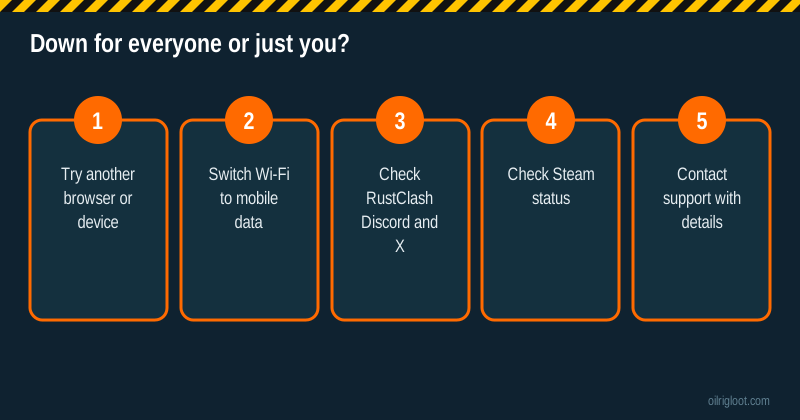
If RustClash won't load, first check whether it's down for everyone or just you: try a different browser or device, switch from Wi-Fi to mobile data, and look at RustClash's Discord or X account for announcements. Most "RustClash is down" moments are actually a browser extension, a network hiccup, a Steam outage or a location block. Real site-wide outages do happen, but they're usually short. This guide gets you from "it's broken" to the actual cause fast.
RustClash is 18+ (or your local age of majority), not offered in Idaho, Montana, Michigan, Nevada or Washington, and holds no gambling licence.
Step 1: Is it down for everyone?
Run these quick tests in order:
- Try another browser. If it works in a different browser, the problem is an extension, cookies or cache in your usual one.
- Try another device. Phone works but PC doesn't? It's the PC.
- Switch networks. Turn off Wi-Fi on your phone and use mobile data. If it loads on data but not Wi-Fi, your home network, router or internet provider may be the issue. Some school, work and public networks block gambling sites.
- Check official channels. RustClash links its Discord and X (Twitter) accounts in the site footer. When there's maintenance or an outage, that's where notices usually appear.
- Check Steam. If login with Steam or skin trades fail but the site loads, Steam itself may be having trouble. Steam often has scheduled maintenance on Tuesdays (Pacific time), and trades and logins can be patchy during it.
If everything fails on every device and network, and other players in Discord are saying the same, it's down. Wait it out. Don't keep re-submitting deposits during an outage.
Step 2: Fix it by symptom
| What you see | Likely cause | What to try |
|---|---|---|
| Page won't load at all | Network block, DNS, or real outage | Mobile data test, then official channels |
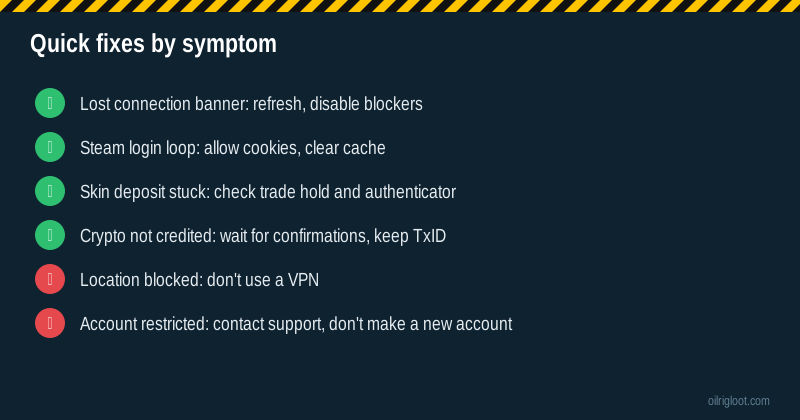
| "Lost connection... attempting to reconnect" banner | Live connection dropped | Refresh, disable ad/script blockers, try another browser |
| Endless Steam sign-in loop | Cookies blocked, cache | Allow cookies for the site, clear cache, try Google or email sign-in |
| Cloudflare check page that won't finish | Browser privacy settings, VPN, extension | Turn off extensions, allow JavaScript, disconnect VPN |
| Games load but bets don't place | Connection drop or balance sync | Refresh, check balance, check history |
| Skin deposit stuck | Trade hold, authenticator under 15 days, Steam issue | See below |
| Crypto deposit not showing | Confirmations still pending | See below |
| "Not available in your region" | Location restrictions | Don't use a VPN; it's not for your location |
The "Lost connection" banner
RustClash keeps a live connection open for chat, game results and balance updates. When it drops, you'll see a banner saying you've lost connection and it's trying to reconnect. Usually a refresh fixes it. If it keeps coming back, the common culprits are aggressive ad blockers or script blockers, unstable Wi-Fi, or a browser that's been open for days. Close the tab, reopen it and try again.
Mid-spin disconnects
This is the one that panics people. RustClash's FAQ says its provably fair system decides the item as the animation starts, so even if you leave or lose connection, you're still credited. Refresh, then check your balance and game history. If you want to double-check a result, our provably fair guide shows how.
Step 3: Deposit-specific problems
Skin deposits
RustClash's FAQ says skin deposits can take a few minutes to register, depending on Steam. If you're on a trade hold or haven't had Steam Mobile Authenticator on your phone for more than 15 days, deposits won't come through and must be cancelled until you've passed the 15-day mark. That's a Steam rule, not RustClash being down. Our trade hold guide explains how to clear it for good.
Crypto deposits
RustClash uses Fireblocks for crypto, and deposits need several blockchain confirmations before they're credited. That can take from a few minutes to a few hours depending on the coin. If you closed the payment page before the funds confirmed and the balance never arrived, RustClash's FAQ asks you to contact them with proof. Keep the transaction ID (TxID), amount and time. If you sent on the wrong network, that's a separate problem; contact support straight away.
Card and other payments
If a card payment fails, the site isn't necessarily down. Banks often decline gambling payments or merchants outside your country. Our card deposit guide covers declines.
Step 4: Free cases and rewards not working
If the site works but your free cases won't open, it's usually not an outage. RustClash's FAQ says you must join its Discord and connect your account to redeem free cases, and the level-5 case needs KYC to open for free. Our free case troubleshooting page runs through every common cause.
When it's not down: you're blocked or restricted
Two situations look like an outage but aren't:
Location restrictions. RustClash's terms say it isn't available in Idaho, Montana, Michigan, Nevada or Washington, and isn't offered where participation is prohibited or restricted. If you see a region message, that's the answer. Using a VPN to get around it breaks the terms and can get your account closed with the balance held.
Account restrictions. If the site loads for others but your account can't play, withdraw or log in, your account may be under review, for example a KYC check. Contact support. Don't open a second account; RustClash's terms treat things like stacking free rewards as prohibited conduct, and multiple accounts make your situation worse. If KYC is the hold-up, our KYC guide explains what to send.
Is your balance safe during an outage?
A site going offline for a while doesn't mean your balance disappears. RustClash uses a balance system rather than an onsite inventory: what you win is held as gems on your account, and the result of a spin is fixed when it starts. When the site comes back, check three things: your gem balance, your game history and your transaction history. Compare them with what you remember or screenshotted. If something's missing, raise it with support while the details are fresh.
The bigger risk with any skin site isn't a short outage; it's leaving a large balance sitting there for weeks. RustClash holds no gambling licence, so if something serious went wrong there'd be no regulator to step in. Withdraw what you don't plan to play with soon. Our withdrawal time guide shows how long each route takes.
Battles and multiplayer games during a drop
Case battles involve several players, so people worry about what happens if the connection goes during one. The same principle applies as with single cases: results are decided by the provably fair system on the server, not by your screen. If your browser drops mid-battle, refresh and open your battle history. The outcome there is the real one, even if you missed the animation.
Blocked by your internet provider or country
In some countries, regulators can order internet providers to block offshore gambling sites. Australia's ACMA is a well-known example. If the site fails on your home connection and on mobile data in the same country, but players elsewhere say it's fine, a local block is a likely cause. That's not an outage, and getting around it with a VPN goes against RustClash's own location rules. Take it as the answer for your location.
Contacting RustClash support
If you've ruled out your side and it's still broken, contact support with:
- Your username or Steam ID.
- What you were doing and the exact error message.
- Device, browser and whether you tried mobile data.
- For deposits: TxID or Steam trade offer details, amount and time.
- Screenshots.
RustClash lists admin@rustclash.com and a contact page in its footer, and live chat and Discord are commonly used too. Never share your password or Steam login with anyone claiming to be support, and ignore DMs offering to "fix" your account for a fee.
Things not to do while it's down
- Don't spam deposits hoping one goes through.
- Don't use "mirror" sites or links from strangers in Discord or YouTube comments. Fake RustClash login pages exist to steal Steam accounts. Type the address yourself or use a bookmark.
- Don't chase losses on another site while you wait.
- Don't install browser extensions that promise to fix it.
Quick summary
- Test another browser, device and network.
- Check RustClash's Discord or X and Steam's status.
- Match your symptom to the fix table.
- For deposits, check trade holds or crypto confirmations before assuming it's an outage.
- Contact support with full details if it's still stuck.
Outages are a good moment to step back. If you notice you're anxious to get back on, that's worth paying attention to. In the US call or text 1-800-GAMBLER, or see our responsible gambling page.