How to Deposit on RustClash With Neteller
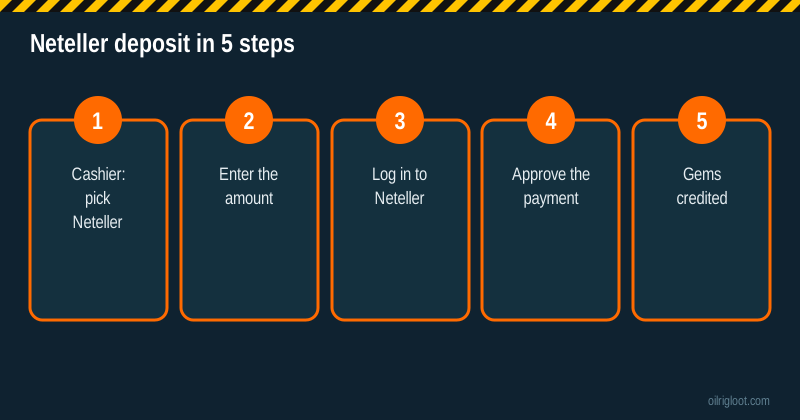
To deposit on RustClash with Neteller, open the cashier, choose Neteller, type the amount, log in to your Neteller wallet in the window that pops up and approve the payment. Your gems usually show up within moments of approval. Before you do it, know one big thing: you can't withdraw back to Neteller. RustClash pays out in Rust skins or crypto, so Neteller is a one-way door.
RustClash is 18+ (or the age of majority where you live), not available in Idaho, Montana, Michigan, Nevada or Washington, and holds no gambling licence. Only use money you're fine losing.
What Neteller is, in one minute
Neteller is an e-wallet run by Paysafe, the same group behind Skrill and paysafecard. You load it from a bank account, card or other methods, then spend from the wallet balance online. Gamers like it because the merchant never sees your card or bank details, and because it's been around online gaming for a long time.
The flip side is that Neteller is a regulated payment service. It runs identity checks, sets limits and can charge fees for things like currency conversion or dormant accounts. That's not a problem, it just means you want your wallet sorted before you get to the RustClash cashier.
Before you start
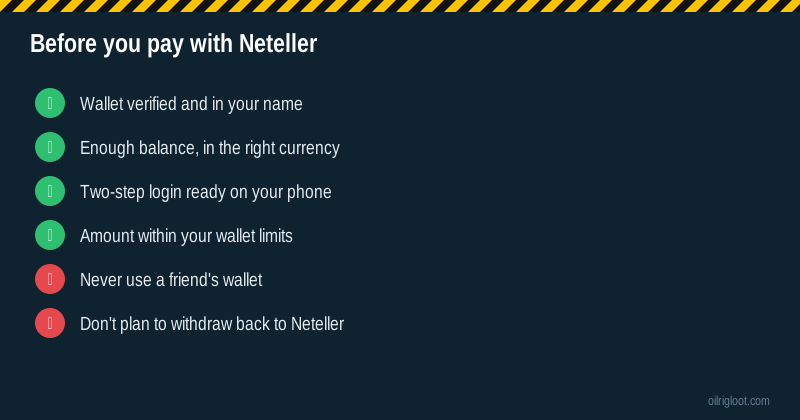
| Check | Why it matters |
|---|---|
| Your Neteller account is verified | Unverified wallets often hit low limits or blocks on payments |
| Wallet is in your own name | Mismatched names cause problems if RustClash runs KYC |
| Balance is loaded | The cashier pulls from your wallet balance, not your card |
| You know your wallet currency | RustClash prices in gems tied to US dollars, so a EUR or GBP wallet gets converted |
| Two-step login ready | Neteller usually asks for a code or app approval |
| RustClash account through an invite | That's how the 5% boost and 3 free cases get attached |
New here? Our sign-up guide walks through the invite link, Steam login and Discord step in about five minutes.
Step by step: paying RustClash with Neteller
Step 1: Pick Neteller in the cashier
Sign in to RustClash, open the purchase area and look under traditional payment methods. Click Neteller. If you don't see it, it may not be offered for your country right now. In that case skip to the alternatives below.
Step 2: Enter the amount
Type how much you want to deposit. Pick a number you decided on before you opened the site, not one you came up with mid-session. If your Neteller wallet isn't in US dollars, keep in mind the converted amount may come out a little different from what you typed once fees and rates are applied.
Step 3: Log in to Neteller
A Neteller window or redirect opens. Enter your Neteller email and password, then complete the two-step check. Make sure the page address really is Neteller's before you type your password. Fake payment pages are a known trick.
Step 4: Approve the payment
Neteller shows you the merchant, amount and any conversion. Check it, then approve. If something looks off, cancel and start again rather than approving and hoping.
Step 5: Check your balance
You land back on RustClash. Wallet payments are usually close to instant. If you redeemed an affiliate code before this deposit, the 5% boost applies to it. It's a small bonus on your next deposit, so it isn't worth stretching your budget for.
What it can cost
Neteller fees depend on your country and account, and they change, so treat this as a list of what to check rather than exact figures.
| Possible cost | When it applies | Where to check |
|---|---|---|
| Loading fee | When you add money to the wallet, depending on method | Neteller fees page |
| Currency conversion | When your wallet currency isn't USD | Neteller fees page, payment screen |
| Inactivity fee | If the wallet sits unused for a long stretch | Neteller fees page |
| Withdrawal fee | When you move money out of Neteller to your bank | Neteller fees page |
| Card-side charges | If you load Neteller by card and your bank treats it as a cash-like purchase | Your bank or card terms |
A made-up example to show how small costs stack: you load €40 into Neteller, convert to dollars at a rate that includes a few percent markup, and land around $41 to $42 on RustClash instead of the $43 or so a mid-market rate would give. Add a loading fee if your method has one. It's not a lot on one deposit, but it adds up over a month of small top-ups. Fewer, planned deposits are cheaper than lots of tiny ones.
Neteller payment declined? The usual reasons
- Wallet not verified. Finish Neteller's verification and try again.
- Not enough balance. The cashier spends your wallet balance. Load it first.
- Limits reached. New or basic accounts often have lower limits. Check your account's limit page.
- Currency trouble. Some payment routes struggle with certain wallet currencies. Try a smaller amount or check whether a USD balance helps.
- Gambling-type payments restricted. Rules differ by country, and Neteller may block payments it treats as gambling where local rules require it. If that's the case, don't try to dodge it. Pick a different method or take it as your sign to skip.
- RustClash side. Rarely, the cashier route itself is down. Wait a while or contact RustClash support.
Neteller compared with other RustClash methods
| Method | Speed | Withdraw back to it? | Good if... |
|---|---|---|---|
| Neteller | Usually instant | No | You already use Neteller and don't want to share card details |
| Visa / Mastercard | Usually instant | No | Your bank allows gambling merchants |
| Trustly | Usually instant | No | You'd rather pay straight from your bank |
| Rust or CS2 skins | Minutes (if no trade hold) | Yes, as skins | You already hold skins and have the Steam authenticator set up |
| Crypto | Minutes | Yes, as crypto | You want the same route in and out |
The pattern is clear: if you want to cash out the same way you paid, skins and crypto are the two-way routes. Neteller, cards and Trustly only go in. See our guides to card deposits, CS2 skin deposits and Solana deposits if one of those suits you better.
Planning your withdrawal before you deposit
Because payouts don't go back to Neteller, think about how you'd take money out if you win.
- Skins to Steam. You pick Rust skins from the onsite store and they're sent to your Steam account. Selling them on the Steam Market gives Steam Wallet funds, which you can't send to a bank. Read how withdrawal times work before you rely on this.
- Crypto. You get coins in your own wallet and can sell them on an exchange. Third-party reviews mention a 2% to 5% crypto withdrawal fee, so check the current figure on the withdrawal screen. Our crypto withdrawal guide walks through it.
- Playthrough. Third-party reviews report a 1x playthrough on deposits before withdrawal, meaning you need to wager your deposit amount once.
- KYC. RustClash can ask for identity checks at certain levels or on payouts. Our KYC guide lists what to have ready.
If none of those exit routes work for you, that's a good reason not to deposit at all.
Staying safe with Neteller
- Use your own wallet only. Using someone else's Neteller is against both services' rules and can freeze two accounts at once.
- Turn on two-step login for Neteller, RustClash and your email.
- Never approve a payment you didn't start yourself.
- Ignore "support agents" messaging you in chat or Discord asking for wallet logins.
- Don't use a VPN to get around location rules. If you're in an excluded state or your country restricts this kind of play, the answer is no.
Paying with Neteller on your phone
The flow is the same on mobile, with a couple of small differences. If you have the Neteller app installed, the approval step may push a prompt to the app instead of asking for a code, so keep the app logged in. Pop-up blockers in some mobile browsers stop the Neteller window from opening; if nothing happens when you tap pay, allow pop-ups for the RustClash site and try again. And because phones make quick top-ups very easy, it's worth switching on any spending controls Neteller offers for your account, or simply not saving your Neteller password in the browser so every deposit takes a deliberate moment.
Who should skip Neteller here
Neteller isn't the right pick for everyone. Skip it if you don't already have a verified wallet, since setting one up just for a skin site adds identity checks and fees for little gain. Skip it if you're hoping to get winnings back the same way, because that won't happen. And skip RustClash altogether if you've self-excluded anywhere, you're under 18, or you live somewhere this kind of play is restricted.
Common mistakes
- Depositing before joining through an invite and missing the 5% boost.
- Forgetting the wallet currency and getting a worse conversion than expected.
- Assuming you can withdraw back to Neteller.
- Topping up again and again in one session. Set one deposit per session and stick to it.
- Leaving a small leftover balance in a Neteller account you never use, then getting hit by an inactivity fee months later.
Is Neteller a good way to pay on RustClash?
If you already have a verified Neteller wallet and want to keep card details away from a skin site, it's a clean, fast way in. It's not a way out, though, so be comfortable with skins or crypto for withdrawals before you start. RustClash is unlicensed, which means there's no regulator to fall back on, so keep deposits small and screenshots of every payment.
If gambling stops being fun, step away. In the US call or text 1-800-GAMBLER; in the UK the National Gambling Helpline is 0808 8020 133. Our responsible gambling page has more options.