How to Deposit on RustClash With Trustly
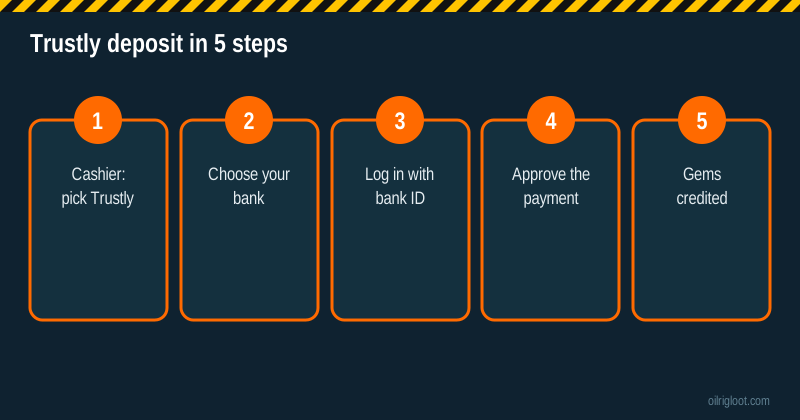
Trustly lets you pay RustClash straight from your bank account using your bank's own login, with no card and no crypto wallet. In the cashier you choose Trustly, pick your bank, sign in with your usual bank ID or app, approve the amount and the gems are normally credited within moments. The things to check first are whether your bank is supported in your country, whether you have a gambling block switched on, and how you'll withdraw later, since payouts come as skins or crypto.
We earn a commission when you sign up through our link. We describe how Trustly and the RustClash cashier work; we aren't claiming we tested every bank in every country.
Trustly on RustClash at a glance
| Item | Details |
|---|---|
| How it works | Direct payment from your bank via your bank's login |
| Card needed | No |
| Where it works | Banks in countries Trustly supports (mostly Europe, some others) |
| Speed | Usually near-instant |
| Withdraw back to bank | Not listed; payouts are skins or crypto |
| Invite boost | 5% on your next deposit after redeeming a code |
What Trustly actually does
Trustly is an open-banking payment service. Instead of typing card numbers into a site, you're passed to a Trustly window where you choose your bank and log in exactly as you would on your bank's own website or app. Your bank then sends the payment. Trustly passes the confirmation to RustClash, and the site credits your balance.
The upside is that the merchant never sees your bank credentials or card details. The trade-off is that your bank stays fully in the loop, so its fraud checks, transfer limits and any gambling block you've set all apply.
Before you deposit
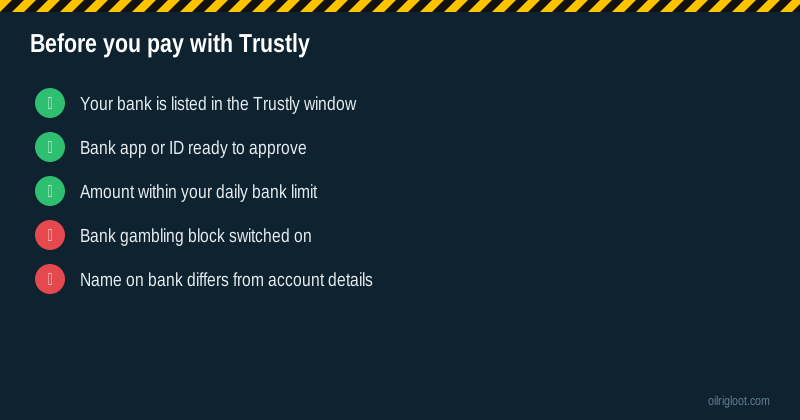
- Check your country. Trustly works with banks in a list of supported countries. If you don't see Trustly in the cashier, it probably isn't offered where you are.
- Have your bank login ready. That might be a mobile banking app, a BankID-style ID, a card reader or a one-time code.
- Know your daily limit. Banks often cap online payments per day; a larger deposit may need splitting or a limit change.
- Match the names. The bank account should be in your name. Mismatches can trigger KYC questions later.
- Decide how you'll withdraw. Set up Steam for skin payouts or a crypto wallet before you need it.
Step-by-step: paying with Trustly
- Log in to RustClash and open the deposit cashier. New? Follow our sign-up guide and join through an invite first.
- Pick Trustly from the payment methods.
- Enter the amount you want to deposit.
- Choose your bank in the Trustly window. Use the search box if your bank isn't shown at first.
- Log in with your bank's normal method.
- Select the account to pay from, if you have more than one.
- Review and approve. Check the amount and the payee line before you confirm in your bank app.
- Return to RustClash. Your gems should show within a moment or two.
Which banks and countries work?
Trustly connects to thousands of banks, with its strongest coverage in the Nordic countries, Germany, the Netherlands, the Baltics, Spain and other parts of Europe, plus a growing presence elsewhere. Which of those banks show up for a given merchant can differ, and gambling payments can be switched off by the bank or limited by local law. The only reliable test is to open the RustClash cashier and see whether Trustly, and then your bank, appears. If it doesn't, there's nothing to fix; pick a method that is offered.
A quick example
Imagine you're in Finland and want to put 25 euros into RustClash. In the cashier you choose Trustly, type 25, pick your bank from the list and confirm with your bank's mobile app. The bank sends the payment, Trustly confirms it to RustClash, and your balance shows the gem value of 25 euros at the conversion rate used. If it's your first deposit after joining through an invite, the 5% boost adds a little over a euro's worth of gems. The figures are just an illustration of how the flow works.
Business accounts, joint accounts and cards linked to banks
Use a personal account in your own name. Business accounts can trigger compliance checks at your bank, and joint accounts can cause name-mismatch questions during KYC. If you have several accounts at the same bank, Trustly will usually ask you to choose one; pick the account you'd be comfortable showing in a verification request.
Why Trustly payments get declined
| Reason | What to do |
|---|---|
| Gambling block on your account | That block is doing its job; leave it on if you set it |
| Bank declines offshore gambling merchants | Your bank's decision; try a different supported method only if allowed |
| Daily online payment limit reached | Lower the amount or wait until tomorrow |
| Login or approval timed out | Start again from the cashier and approve faster |
| Account not in your name | Use an account in your own name |
| Bank not supported | Pick another method listed in the cashier |
Never try to work around a gambling block you set for yourself. If you didn't set one and your bank still declines, that's its policy for unlicensed gambling merchants, and RustClash holds no gambling licence.
Currency, gems and bank statements
RustClash balances are in gems valued in US dollars, while your bank account is likely in euros, pounds, kronor or another currency. The conversion happens at deposit, and your bank or the payment route may apply its own rate. Check your bank statement against your gem balance the first time so you know the real cost. The payee name on your statement may not say "RustClash"; note the date and amount so you can match it.
Getting money back out
Trustly is a deposit route here. RustClash's listed payouts are:
- Rust skins from the onsite store, sent to your Steam account by trade offer (Steam Mobile Authenticator, public inventory and trade URL needed).
- Crypto to your own wallet. Third-party reviews mention a 2% to 5% fee and a 1x playthrough on deposits. Our crypto withdrawal guide covers it, and our withdrawal time guide explains typical waits.
Expect KYC at some point, especially before larger payouts. Because a Trustly deposit is tied to your named bank account, having matching ID ready makes verification smoother. See our KYC guide.
Trustly vs other deposit methods
| Method | Strength | Weakness |
|---|---|---|
| Trustly | No card, uses your bank's security | Bank blocks and limits apply; deposit-only |
| Card | Familiar and quick | Card gambling blocks; foreign fees (card guide) |
| Crypto | Same rail for deposits and payouts | Network choice and price swings (Solana guide) |
| Skins | No money changes hands at deposit | Steam holds (trade hold guide) |
Safety tips
- Start every payment from the real cashier. Bookmark the official site; lookalike domains exist.
- Never approve a bank request you didn't start. If your bank app asks you to confirm a payment you didn't make, decline it and call your bank.
- Ignore anyone offering to "deposit for you" through Trustly in exchange for your bank login. That's a scam, and it hands over your account.
- Check the payee line in your bank app before approving.
Is the 5% boost available with Trustly?
Yes. The 5% boost from redeeming an affiliate code applies to your next deposit with any supported method, and joining through our invite adds it automatically, with no code to type. On a 40-unit deposit it's roughly 2 extra in gems. Nice to have, but don't let it change how much you deposit.
A note on budgets with bank payments
Paying straight from your bank is convenient, and convenience is exactly what makes overspending easy. A few habits help. Decide a monthly amount before you open the cashier, and stick to it even after a win. Use your bank app's spending alerts so every gambling payment pings your phone. If your bank offers a gambling block or a cooling-off setting, consider switching it on for the days you don't plan to play. And never move money from savings or bills into a gambling deposit; if that's starting to happen, it's time to pause and talk to someone.
Rules and help
RustClash is 18+ (or the age of majority where you live), isn't licensed and isn't available in Idaho, Montana, Michigan, Nevada or Washington. Its terms also say it isn't offered where participation is prohibited or restricted, so check your local rules. Gamble only with money you can afford to lose. Free help is on our responsible gambling page, including BeGambleAware and 1-800-GAMBLER.
Verdict
Trustly is a tidy way to fund RustClash from your bank without a card or crypto: choose your bank, approve in your banking app and your gems usually show straight away. Check that your bank is supported, respect any gambling block, and have a skin or crypto withdrawal route ready before you need it.